



.webp)
Most hiring teams focus on attracting applicants. But volume means little if candidates don’t actually complete the application form.
The average application drop-off rate is 41.2%, according to our State of Hiring research. Which means nearly half of the candidates who land on a form abandon it before submitting.
That’s not surprising when application processes often:
- Feel long or overly complicated
- Include significant upfront assessments
- Require re-entering information already on their CV
- Lack clarity around salary, work model, or next steps
Yet in many cases, the fixes are straightforward, with high drop-off rates usually reflecting a process designed around internal preferences rather than the candidate experience.
But hiring is not a one-way transaction. Candidates are evaluating your process as much as you’re evaluating them.
This is why high-performing hiring systems treat the application stage as a conversion point, not an administrative form.
This guide shows you how to improve your job application process to reduce candidate drop-off and increase completion rates. You’ll learn how to:
- Understand where candidates drop off
- Design a high-converting application process
- Track the right metrics to continue improving your processes
TL;DR — Key takeaways:
|
What is the application process exactly, and where does it fit in the typical hiring process?
The application process refers to what happens from the moment a candidate clicks “Apply” through submission, confirmation, and waiting for a first response.
It is the entry point into the wider hiring process, which continues through screening, interviews, evaluation, and the offer stage.
A typical hiring process includes:
- Defining the hiring need and writing the job description
- Publishing the role, creating the application page, and running recruitment ads across platforms
- Receiving candidate applications (form, CV, screening questions) and reviewing them to shortlist qualified candidates
- Conducting screening calls and interviews
- Assessing finalists and making a hiring decision
- Completing references or background checks
- Extending and finalizing the offer
Candidates can disengage at any stage if the experience feels slow, unclear, or impersonal. However, the application stage is the first and most critical conversion point. Friction here increases candidate drop-off and weakens the quality of your downstream hiring pipeline.
What does a high-converting application process look like?
A high-converting application process collects enough information to make a confident screening decision — without asking candidates to put in more effort than necessary.
An effective application process consistently follows these principles:
- It prioritizes completion rate over excessive data collection
An effective application collects only what is required to move a candidate forward. Each additional field increases abandonment risk and reduces overall submission volume.
- It’s mobile-first
75.4% of ATS applications were submitted via mobile devices in 2024. Forms that rely on desktop formatting, long scrolling, or broken autofill create friction and lower completion rates.
- It limits required fields to essentials
Most roles require only basic contact information, a CV upload, and a few role-critical screening questions. As a guardrail, aim for roughly 5–10 required fields at the application stage.
- It sets expectations clearly
Candidates are more likely to complete an application when they understand the time commitment and next steps. High-converting processes show estimated completion time and set clear post-submission expectations.
- It reduces duplicate effort
High-converting forms don’t require candidates to re-enter information already available in their CV. Resume parsing and structured inputs reduce effort without lowering hiring standards.
How to build an application process that reduces candidate drop-off in 6 steps
Optimizing your application process takes a structured approach: audit your current process, remove friction, clarify expectations, and use your ATS to enforce consistency.
The steps below show how to identify abandonment points, refine your application form, improve candidate communication, and prevent unnecessary complexity from creeping back in over time.
Step 1: Measure your current application conversion rate
Start with auditing how your current application process performs.
Use your Applicant Tracking System (ATS) to identify where candidates drop off and how long it takes them to complete the application form.
Track:
- Application completion rate (starts vs. submissions)
- Application drop-off rate
- Average time to complete
- Mobile vs. desktop completion rate
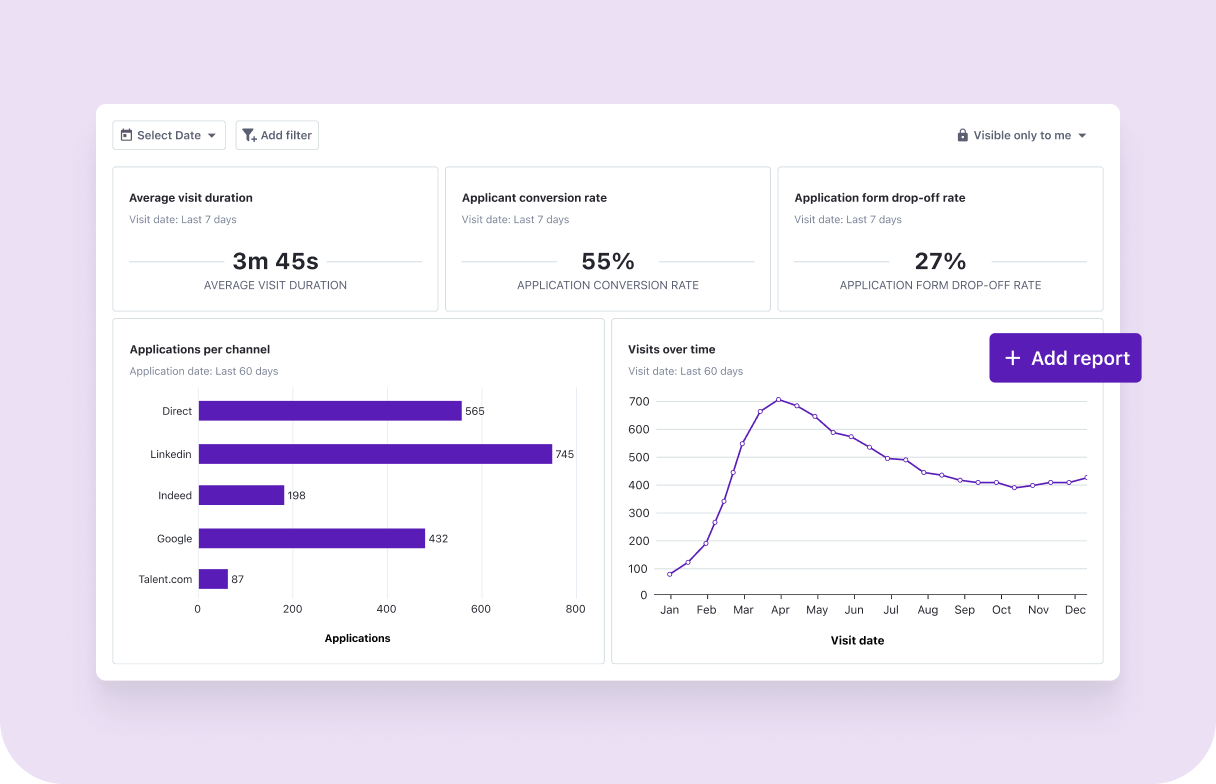
Track application source and conversation metrics in Tellent Recruitee
Now, identify the biggest friction signal first — low mobile completion, long completion time, or a specific field causing drop-off — and prioritize that issue before redesigning the entire form.
If your completion rate drops sharply on mobile or spikes in time-to-complete, for example, that’s your first optimization target.
Step 2: Define application essentials and refine the form
Once you’ve identified where candidates drop off, simplify the form itself.
57% of candidates abandon an application mid-process due to overly complicated or time-consuming requirements.
Focus on removing obstacles that create hesitation or extra work for candidates during submission.
Common friction points that reduce job application completion include:
- Requiring over 10 mandatory fields in the application form
- Forcing candidates to create an account before applying
- Asking candidates to manually re-enter information already on their CV
- Including long open-text or essay-style questions early
- Not displaying an estimated completion time
- Not showing a progress indicator
- Failing to test the full form on mobile devices
At the application stage, ask only for the essentials to decide whether to move a candidate forward. In most cases, this includes their name, email address, CV upload, and one to three role-critical screening questions.
Defer additional information to later stages of the process. This typically includes salary expectations, detailed availability, background disclosures, and diversity data (where legally appropriate).
Step 3: Use screening questions strategically
At the application stage, your goal isn’t to deeply evaluate candidates — it’s to confirm whether they meet the minimum criteria required for a screening call.
As you decide on screening questions to add, ask:
- What decision will this answer influence?
- Is this information essential to move someone to a screening call?
You can add screening questions using ready-to-use templates in Tellent Recruitee or create custom questions for the role.
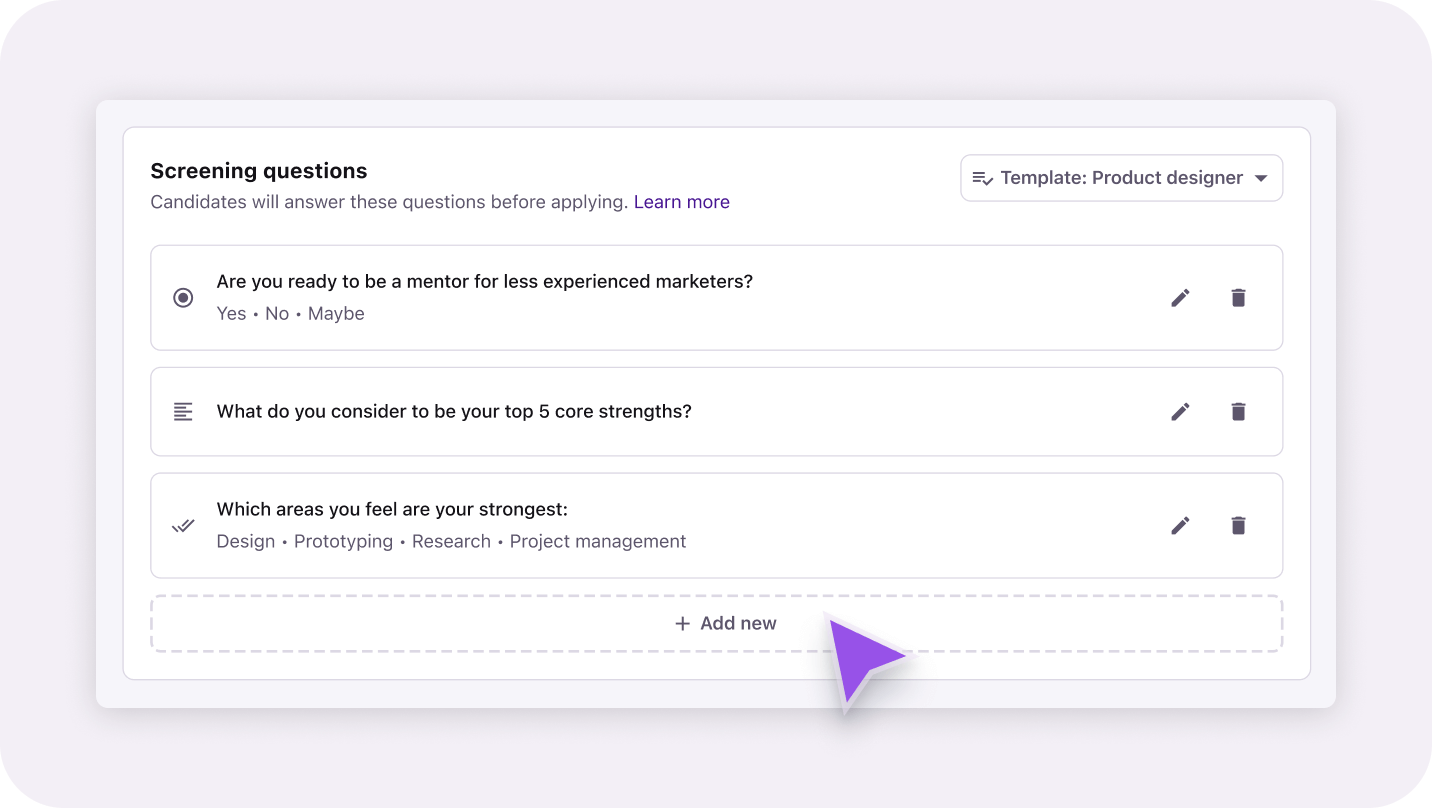
Add custom or templated screening questions to your job application forms
If you find a set of screening questions that drives qualified candidates, save them as a template to use in application forms you create for similar roles.
And if a screening question determines eligibility, turn on the knockout questions toggle to convert the question into a knockout question that automatically disqualifies candidates who don’t fit your job’s requirements:
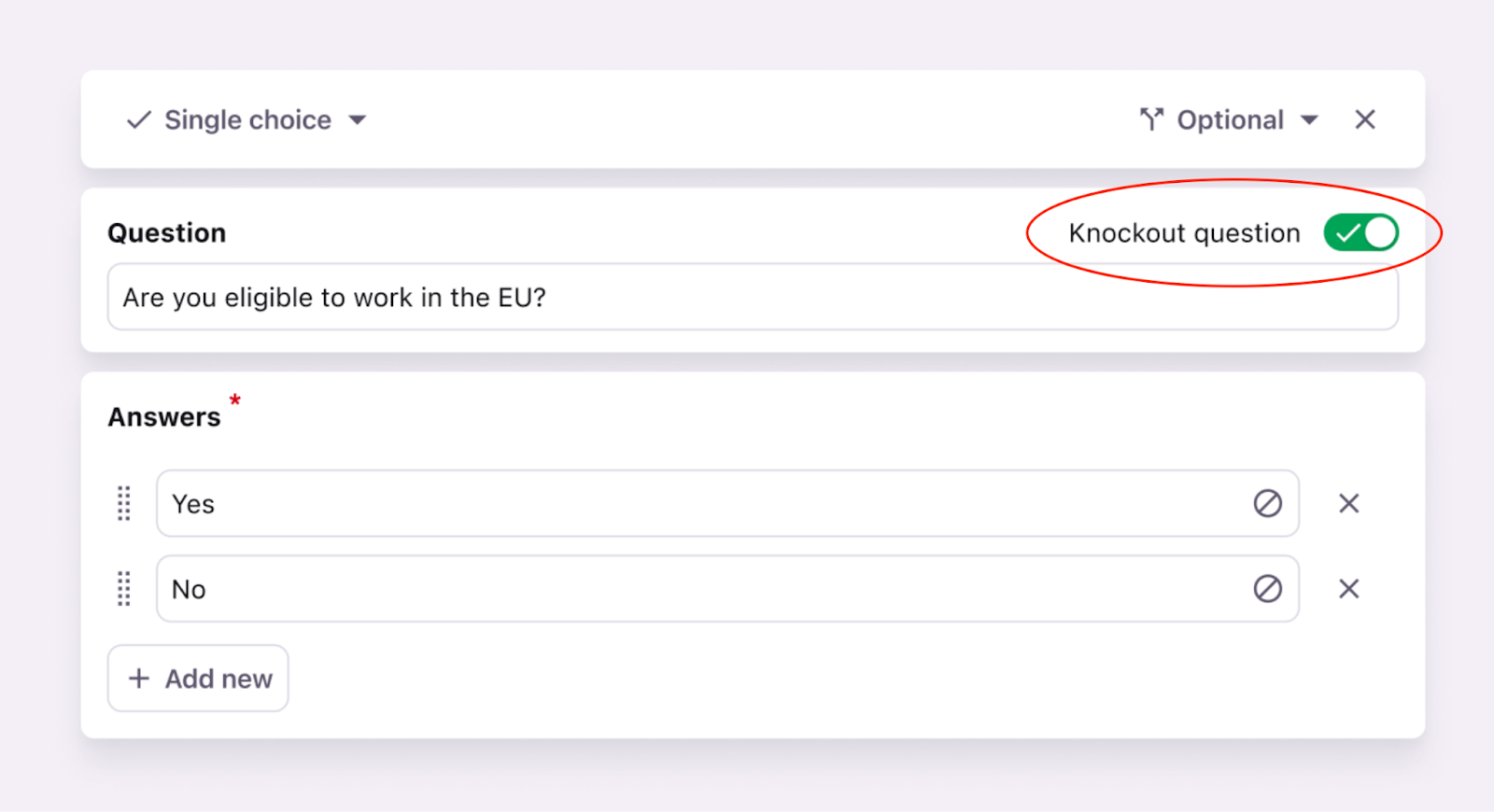
Knock out questions in Tellent Recruitee help you disqualify candidates that don’t meet your baseline eligibility criteria
Knockout questions typically apply when:
- Work authorization is required
- A license or certification is mandatory
- A legal or compliance requirement cannot be waived
Remember, if a question in the application stage doesn’t help you confirm eligibility for the role you’re hiring for, it likely belongs in the interview stage, not the application form.
Also, try to limit to 3–5 focused questions in this stage. Avoid long written responses or questions that repeat information already available on the CV.
Step 4: Set expectations before submitting
Candidates disengage when they feel uncertain about what happens next.
In fact, 71% of surveyed workers say the application process should take less than 30 minutes to complete — making it critical to clearly signal the time commitment upfront.
Before candidates submit their application, reduce uncertainty by setting clear expectations inside the form:
- Display an estimated completion time (e.g., “15–20 minutes”)
- Use a progress indicator so candidates know how far along they are
- Briefly explain what happens after submission (e.g., “Our team reviews applications within 10 business days”)
When candidates understand the time commitment and next steps, they are less likely to abandon the process midway.
Providing clarity in a transparent, consistent manner about what is expected of the job seeker will ensure that applicants don’t drop off due to surprises or a lack of information.
Step 5: Improve post-application candidate experience
Submission is not the end of the application process — it’s the beginning of the waiting period for candidates.
Silence at this stage leads candidates to assume rejection and disengage. In fact, companies with hiring cycles longer than 40 days experience a 12% increase in candidate drop-off rates, reinforcing that speed and clear communication impact candidate retention.
After submission, maintain clarity using automated communication:
- Send an immediate confirmation email (automate it using your ATS)
- Clearly state your response window (e.g., “You’ll hear from us within 10 business days”)
- Briefly explain the next stage in the process (e.g., screening call → interview → decision)
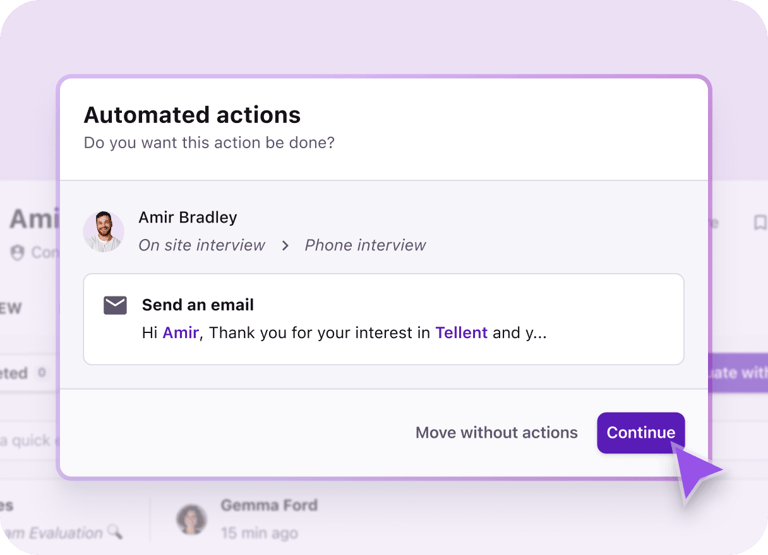
Select an auto-confirmation email template in Tellent Recruitee and automate sending application confirmation emails to candidates who apply to your job openings.
If your typical response time exceeds a week, say so explicitly. When candidates know the timeline, they’re less likely to disengage before first contact.
Additionally, communicate decisions promptly. Notify candidates of acceptance or rejection as soon as a decision is made so they can plan accordingly.
In Tellent Recruitee, when you set knockout questions with underlying disqualifying reasons, you can trigger the system to send an automatic rejection email to the candidate.
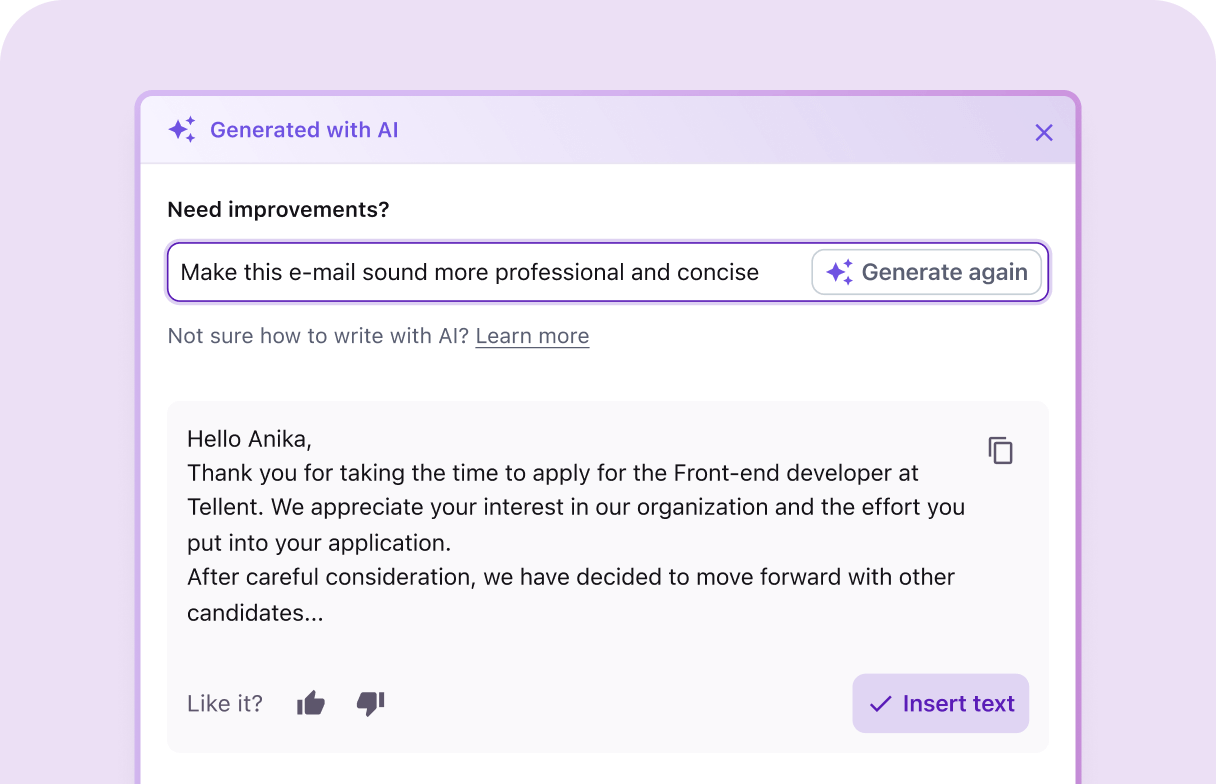
Automate rejection emails to candidates in Tellent Recruitee
When possible, provide brief, constructive feedback to rejected candidates. Clear closure and transparency strengthen employer brand credibility and keep strong candidates open to future opportunities.
Step 6: Assign ownership and review quarterly
Application forms rarely become complex overnight. They grow gradually as different stakeholders add fields, preferences, and “nice-to-have” questions over time.
To prevent your application form from accumulating extra fields that increase completion time without improving screening quality, assign clear ownership of the application form — typically the talent acquisition leader or HR owner.
Also, make sure to review the form on a set cadence
During each review, ask:
- Who owns and approves changes to the form? (In Tellent Recruitee, only Administrator users can access all job forms and make changes)
- When was it last evaluated using completion and drop-off data?
- Have new required fields been added without clear justification?
Use your ATS to support governance, giving users specific permissions and visibility based on their role in your hiring process.
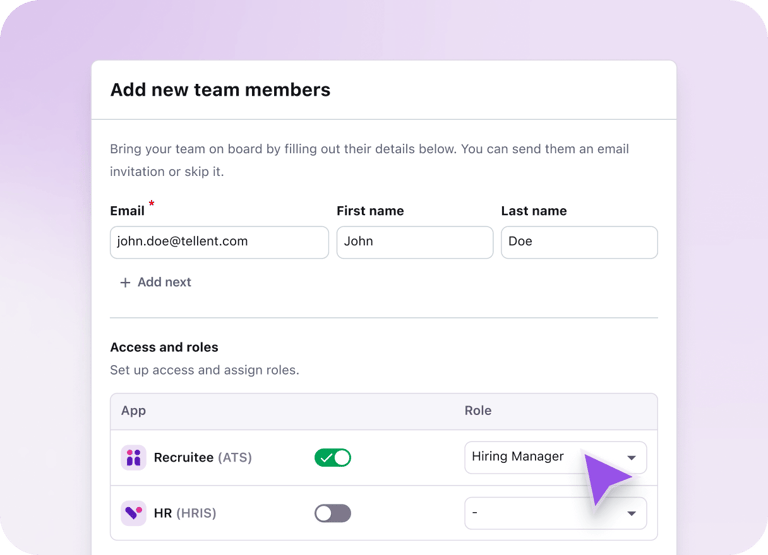
It also helps to set guardrails for optimizing your application process:
- Conduct a quarterly review
- Define a maximum number of required fields
- Require justification for adding new mandatory questions
Treat the application process as a managed system, not a static form. This protects completion rates and supports scalable hiring operations.
Metrics to track to improve your application performance
To improve your application process, measure where candidates drop off, how long it takes them to apply, and which fields create friction. These metrics show exactly what to fix first and what to monitor regularly to improve your application process over time:
|
Metric |
What it measures |
What it tells you |
Application completion rate |
Percentage of candidates who start and successfully submit the application |
A low rate signals friction, excessive required fields, or unclear expectations |
Application start-to-submit time |
Average time candidates take to complete the form |
Longer times often correlate with unnecessary complexity and higher abandonment |
Mobile vs desktop completion rate |
Completion performance by device type |
|
|
|
The specific question where candidates exit the form |
|
Drop-off before submission |
Percentage of candidates who start but do not submit |
A high pre-submission exit rate signals overall UX issues, unclear expectations, or excessive form length |
Application process optimization checklist
Use this checklist to review whether your application process is helping or hurting candidate conversion:
- Make your form easy to access
Ensure candidates can reach the application and start it within a few clicks of viewing the job post. Avoid unnecessary redirects, gated pages, or confusing navigation. Reducing barriers between interest and application protects completion rates.
- Offer flexible application options
Allow candidates to apply through streamlined methods such as LinkedIn profiles or one-click, easy applications where appropriate. Providing flexible submission options reduces effort and lowers entry barriers.
- Remove unnecessary fields from your forms
Only collect information that directly influences your screening decision. Aim for 10 or fewer required fields at the application stage and avoid long open-text responses.
- Avoid mandatory account creation
Requiring candidates to create an account before applying adds unnecessary effort, complicates the process, and increases abandonment.
- Enable resume parsing
Don’t ask candidates to manually re-enter information that already exists on their CV. Duplicate effort increases drop-off.
- Limit screening questions to 3–5
Only ask questions that are absolutely necessary to pre-screen candidates. Prefer structured or multiple-choice responses over long open-text fields to reduce completion time.
- Keep instructions clear and transparent
Use clear calls to action on your job ad and landing pages. Explain what information is required and what candidates should expect from the process. Outline key requirements upfront and link to relevant company or role information early to prevent confusion.
- Make the application experience user-friendly
Design the form to be simple, intuitive, and easy to navigate. Group related fields together, minimize unnecessary scrolling, and avoid repetitive steps.
- Optimize it for mobile devices
Test the full application form on a phone — not just visually, but functionally. Check autofill behavior, field sizing, scroll length, upload experience, and button placement.
- Display progress and time estimates
Show a progress indicator and an estimated completion time (e.g., “4 minutes”) inside the form. Real-time visibility reduces uncertainty during submission and supports higher completion rates.
- Confirm submission immediately
Send an automated confirmation email with a clear timeline (e.g., “You’ll hear from us within 7 business days”).
- Assign ownership
Application forms often grow over time. Assign one owner and review quarterly to prevent unnecessary complexity.
Continuous improvement drives a high-converting application process
An effective application process is not built once — it’s maintained.
Track completion metrics, review drop-off data quarterly, and gather structured feedback from candidates to identify friction early.
Short surveys after submission help uncover usability gaps that metrics alone may miss. The more feedback you gather from applicants, the more precisely you can improve the experience.
Remember, the application process deserves the same level of ownership, measurement, and iteration as every other part of your hiring funnel. Small improvements over time compound — directly improving pipeline quality and reducing candidate drop-off.
Already working on improving your application process and ready to improve the next steps in your hiring workflow? We’ll leave you with these guides:
- Build an effective screening process that reduces time to hire
- Get your hiring team to give interview feedback faster

.jpg?width=1000&name=%5BEN%5D%20Recruiting%20automation%20-%20Website%20image%20-%201220x740%20(1).jpg)