



.webp)

From uploading candidate profiles and scheduling interviews to chasing interviewer feedback and compiling hiring reports, manual tasks in recruitment are everywhere.
Left manual, these steps add unnecessary admin to recruiters’ plates and slow hiring down. Automating them, however, makes a significant difference.
In a customer survey, for example, we found teams using Tellent Recruitee automated 80% of manual recruiting tasks and spent 64% less time on hiring admin.
Streamlining hiring workflows can also reduce time-to-hire by as much as 60%.
But where should you start? Which recruitment tasks are actually worth automating — and how?
This guide walks through 10 manual recruitment tasks worth automating with an Applicant Tracking System (ATS) to save hours of repetitive administrative work and speed up hiring:
- Candidate sourcing and profile uploads
- Candidate tracking across Excel sheets
- Job posting across job boards
- Talent pool management
- Job requisition approvals
- Application screening
- Candidate communication
- Interview scheduling
- Interview feedback collection
- Recruitment reporting
Let’s dive in:
1. How can you automate candidate sourcing and profile uploads?
Use a Chrome extension that connects directly to your ATS to import candidate profiles from platforms like LinkedIn, GitHub, and Facebook in a few clicks — no manual data entry required. This helps keep sourcing fast, centralized, and easier to manage in line with your data protection processes.
Downloading CVs and candidate profiles across platforms like Facebook, LinkedIn, and GitHub, then manually uploading them into your ATS or CRM, quickly turns sourcing into a painstaking, time-consuming task.
But candidate sourcing thrives on speed, specifically in competitive markets like tech. The faster you screen and progress candidates to interview, the lower the risk of losing them to competing offers.
Storing CVs in download folders or on individual devices also creates version control issues and potential GDPR compliance risks.
With Tellent Recruitee's Talent Sourcing Chrome extension, you can import candidate profiles straight into your ATS from external platforms. From there, tag candidates, parse data into candidate profiles, detect duplicate profiles, and move candidates to jobs or other talent pools.
This keeps sourcing fast, centralized, and structured without adding extra steps for recruiters or hiring managers.
2. How do you replace manual candidate tracking in spreadsheets?
Replace spreadsheets with a Kanban-style candidate pipeline inside your ATS. This gives your team a single, real-time view of every candidate across every role — without the version control issues and manual upkeep that come with Excel.
Creating and maintaining candidate spreadsheets consumes valuable time and increases the risk of human error — from mistyped emails to outdated status updates.
Individually stored Excel files also create data security risks, limit team collaboration, and keep recruitment dependent on manual tracking.
As hiring volume grows, even in small teams, spreadsheets become harder to manage and less reliable as a single source of truth.
So instead of juggling disparate files, replace spreadsheets with a candidate pipeline built inside an ATS.
A Kanban-style hiring pipeline, for example, lets you track, move, and manage candidates in one system — allowing you to:
- Organize all candidates in a stages-based hiring pipeline
- Move candidates seamlessly from first interview to final round
- See which roles have been open the longest
- Identify overdue feedback or follow-ups
- Monitor hiring progress at a glance
The best part? You can start with customizable pipeline templates or build department-specific workflows tailored to your hiring process.
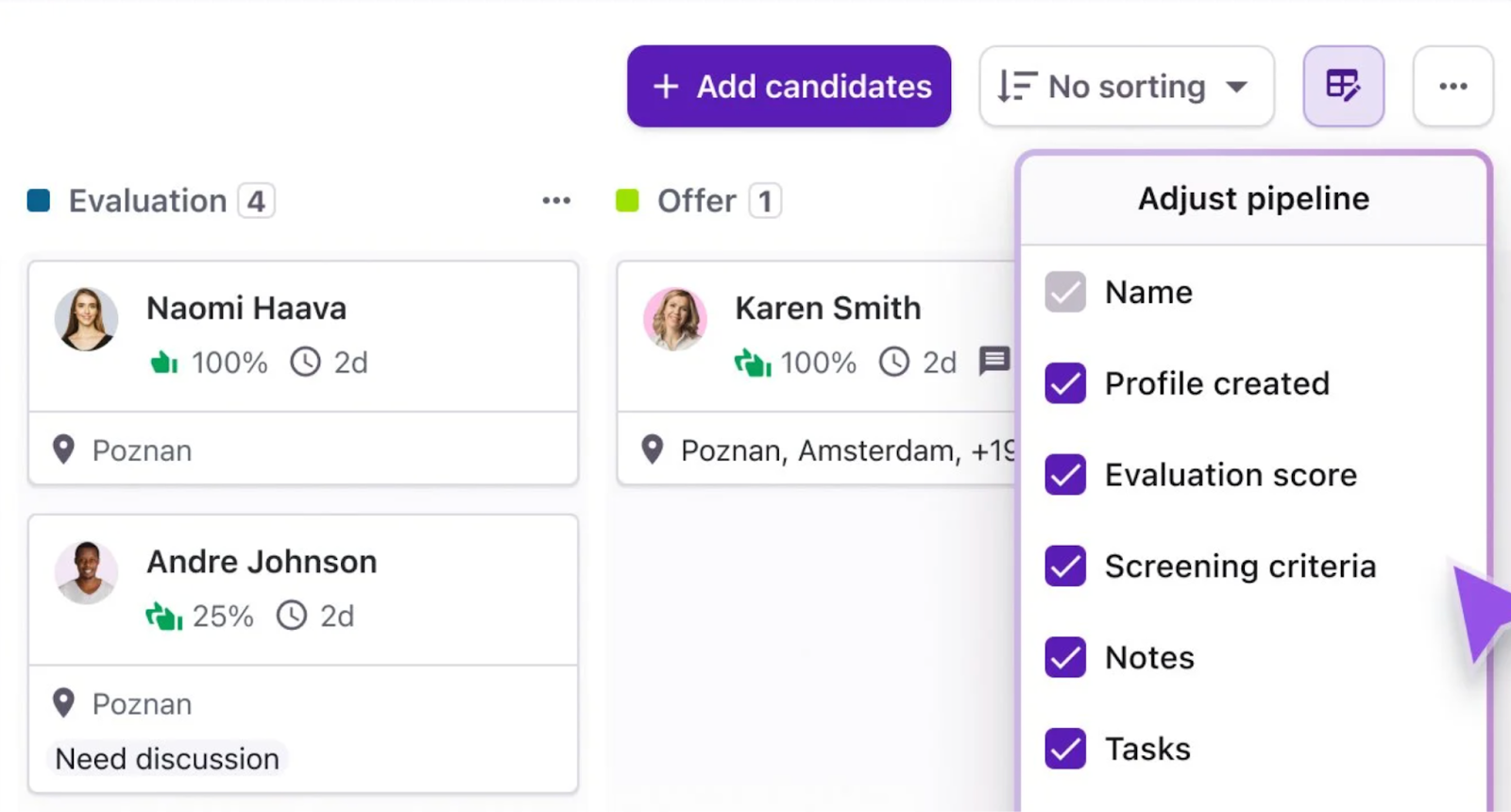
Drag and drop, stage-based candidate pipeline in Tellent Recruitee
By automating candidate tracking in an ATS, you reduce admin work, improve visibility, and create clearer ownership — helping your team make faster, more confident hiring decisions.
3. How can you automate job posting across multiple job boards?
Publish and update roles across thousands of job boards from a single platform, rather than logging into each one manually. Most modern ATS platforms — including Tellent Recruitee — let you do this in just a few clicks.
Posting vacancies across multiple channels is one of the best ways to attract a diverse pool of applications.
But manually publishing roles across different platforms can quickly become time-consuming.
Work on your plate only increases when a role’s requirements change or the position closes. Recruiters then need to individually revisit each platform to update or remove the listing.
Miss this step, and candidates may apply to closed roles or rely on outdated job details — creating a poor candidate experience.
This is why automating job posting across multiple job boards is a no-brainer.
Most modern ATS platforms allow you to publish and update jobs across multiple job boards from one place.
For example, Tellent Recruitee gives you access to more than 2,900 job boards across local and international markets.
By default, the platform automatically sends your published roles to Google for Jobs and Indeed (auto-posting is enabled from onboarding).
You can also promote openings on other jobs boards like LinkedIn or Talent.com by selecting the channel directly in the platform.
Easily select job boards to publish your job posting to.
The system then notifies you as applications start coming in from these channels.
This keeps your roles visible across the right job boards while freeing recruiters from manual posting — so they can focus on evaluating candidates instead of managing listings.
4. How do you automate talent pool management?
Use your ATS to build and maintain structured talent pools instead of spreadsheets — storing candidate profiles, messages, evaluation notes, and activity history in one searchable system you can revisit when new roles open.
In a candidate-driven market, strong candidates move quickly — making it important to be prepared for future roles.
And one of the most effective ways to fill future positions is by building a talent pipeline: a database of active and passive candidates you’ve already engaged and can revisit when new roles open.
But maintaining candidate lists in spreadsheets quickly becomes time-consuming and prone to error.
As the list grows, recruiters need to constantly update information, track conversations, and manually share candidate details with the team.
This makes manual talent sourcing another recruitment task we recommend automating.
Instead of spreadsheets, use your ATS to build and maintain multiple structured talent pools.
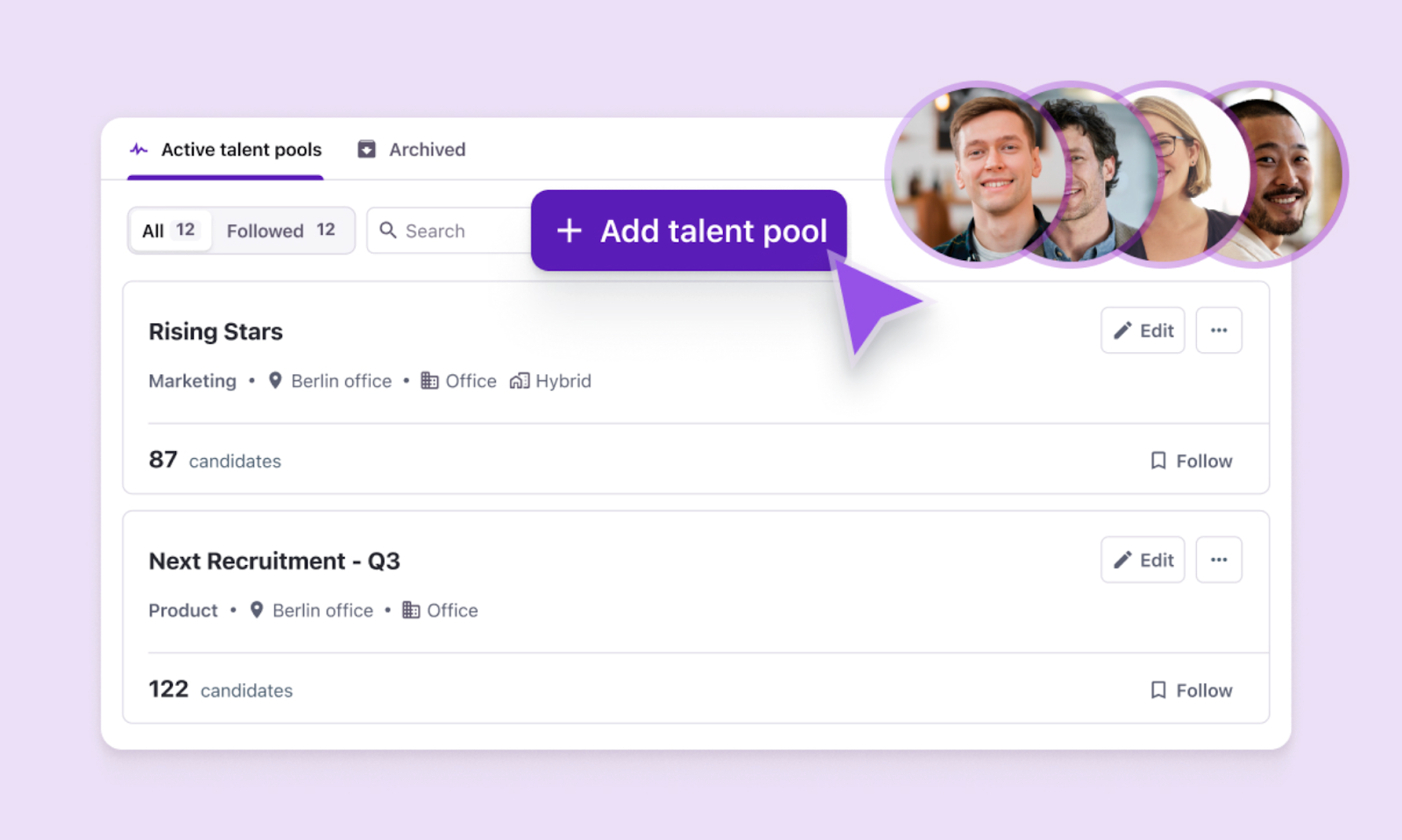
Build talent pipelines in Tellent Recruitee so you don’t have to maintain spreadsheets tracking potential future hires
After receiving an application, you can add candidates to your database, track them for current or future roles — even share them with your team to keep everyone aligned on potential hires.
The system stores candidate profiles, messages, evaluation notes, and activity history — creating a searchable record you can revisit when future roles open.
Ultimately, automating your talent pipeline helps you stay prepared for future hiring needs, nurture promising candidates over time, and quickly reconnect with qualified talent when needed..
5. How can you automate job requisition approvals?
Centralise the entire requisition process in your ATS — giving managers one place to submit requests, stakeholders one place to review them, and recruiters a clear starting point the moment a role is approved.
Creating a new role often kickstarts a multi-step requisition process across teams.
Hiring managers submit a request for a new role, HR reviews it against budget and business needs, and recruiters then meet with the hiring manager to clarify the role and candidate profile.
Along the way, you need to collect and process lots of information, including:
- Title and role level
- Position description and job requirements
- Temporary or permanent position
- Department
- Suggested work location
- Salary range
- Is the position in the budget?
- Is this a new or existing position?
- Suggested working hours
- Supervisor
- Equipment and software
- Target start date
The challenge is that this information often ends up scattered across spreadsheets, emails, and Slack threads.
Without a central place to manage it, it becomes difficult to track requested roles, budgets, and whether requisitions align with the company’s hiring plans.
This is where automating the job requisition approval process helps.
In Tellent Recruitee, requisitions are centralized and automated, much of the information and coordination involved.
Managers can quickly create new requisitions and share them directly with all relevant stakeholders. All relevant information is kept in one place, including the budget for the position, the number of openings, the reason for hiring, and more.
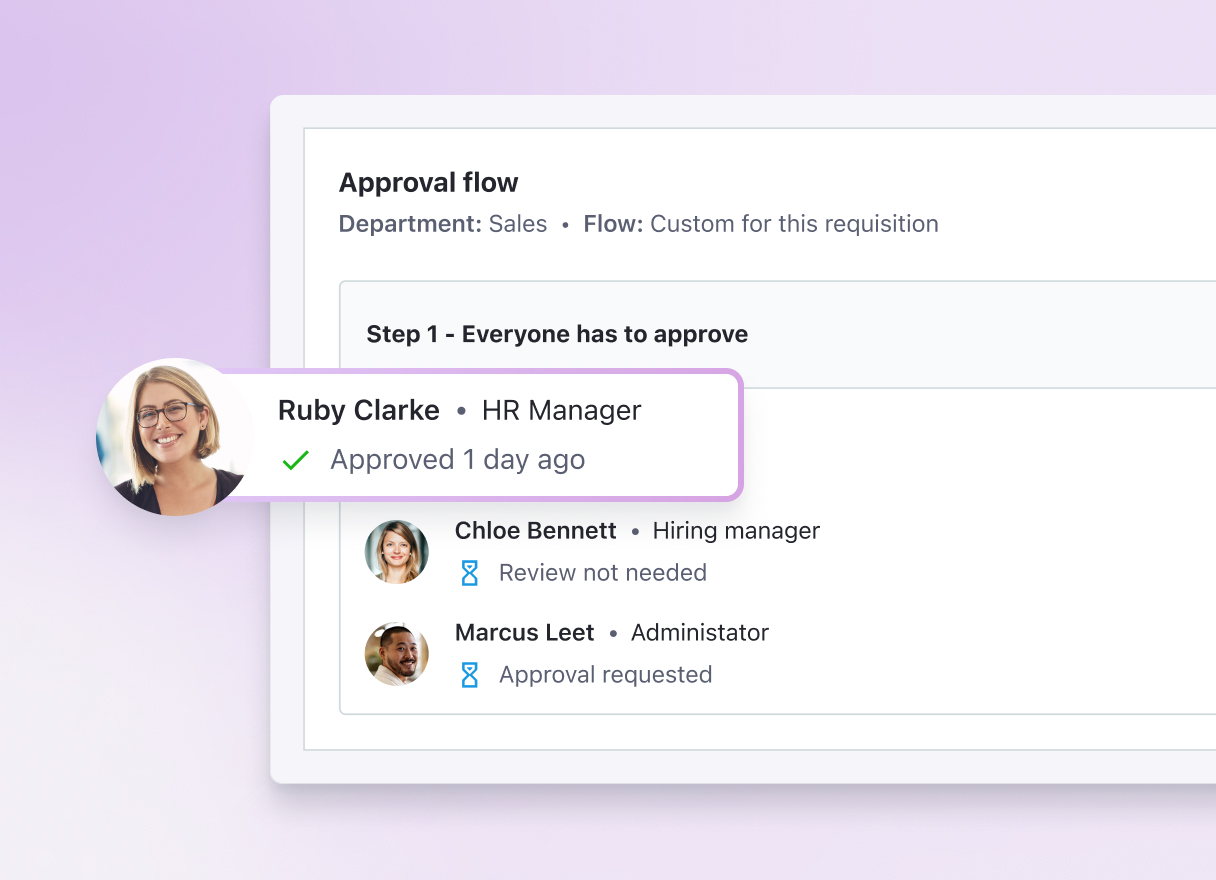
Create job requisitions in the same system you use to manage and hire candidates
You can also set up approval and review steps within the platform to ensure a smooth handoff between all stakeholders.
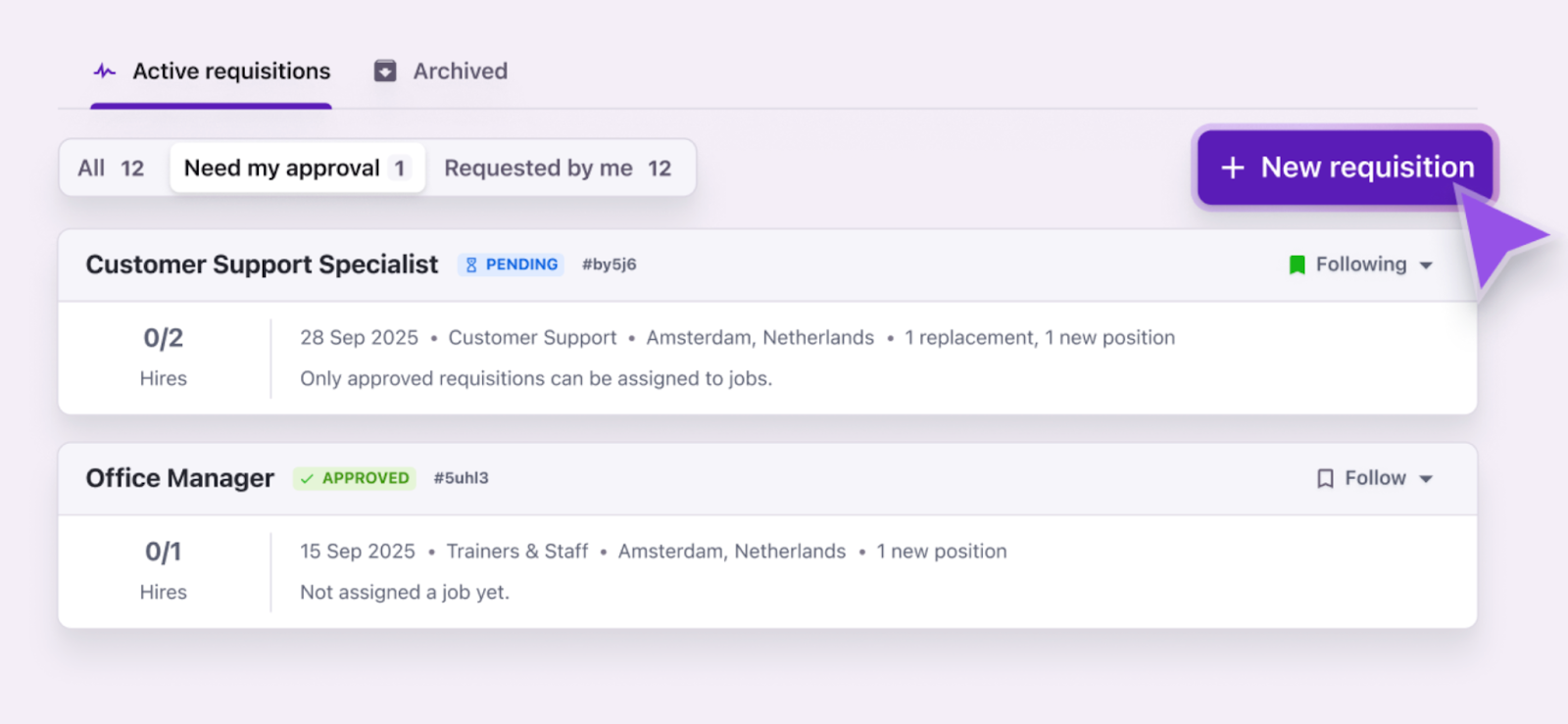
The requisition approval process in Tellent Recruitee
This significantly speeds up the review process, making sure that recruiters can get started sooner with their hiring efforts.
6. How do you automate application screening?
Use AI-assisted screening as an initial filter to quickly assess which applicants meet your predefined job requirements — so recruiters can prioritise the most relevant candidates faster, without manually scanning every CV.
Manually reviewing hundreds — sometimes thousands — of applications to check whether candidates meet basic job requirements is one of the most time-consuming parts of recruitment.
For popular roles, application volume can quickly overwhelm recruiters, turning the first screening step into hours of repetitive resume scanning.
And when this first review slows down, so does the rest of the hiring process. Candidates wait longer for updates — increasing time-to-hire and risking a weaker candidate experience.
An efficient solution here? Use AI-assisted screening as your initial filter (not final decision maker) to quickly assess which applicants meet most of your predefined job requirements.
Screening Assistant in Tellent Recruitee, for example, reviews candidates’ CVs, cover letters, and responses to your screening questions to show how many of your requirements each candidate meets.
The result appears on the candidate profile, showing how the information provided relates to each criterion you defined. By clicking on it, you can see exactly which criteria the candidate meets and where they fall short.
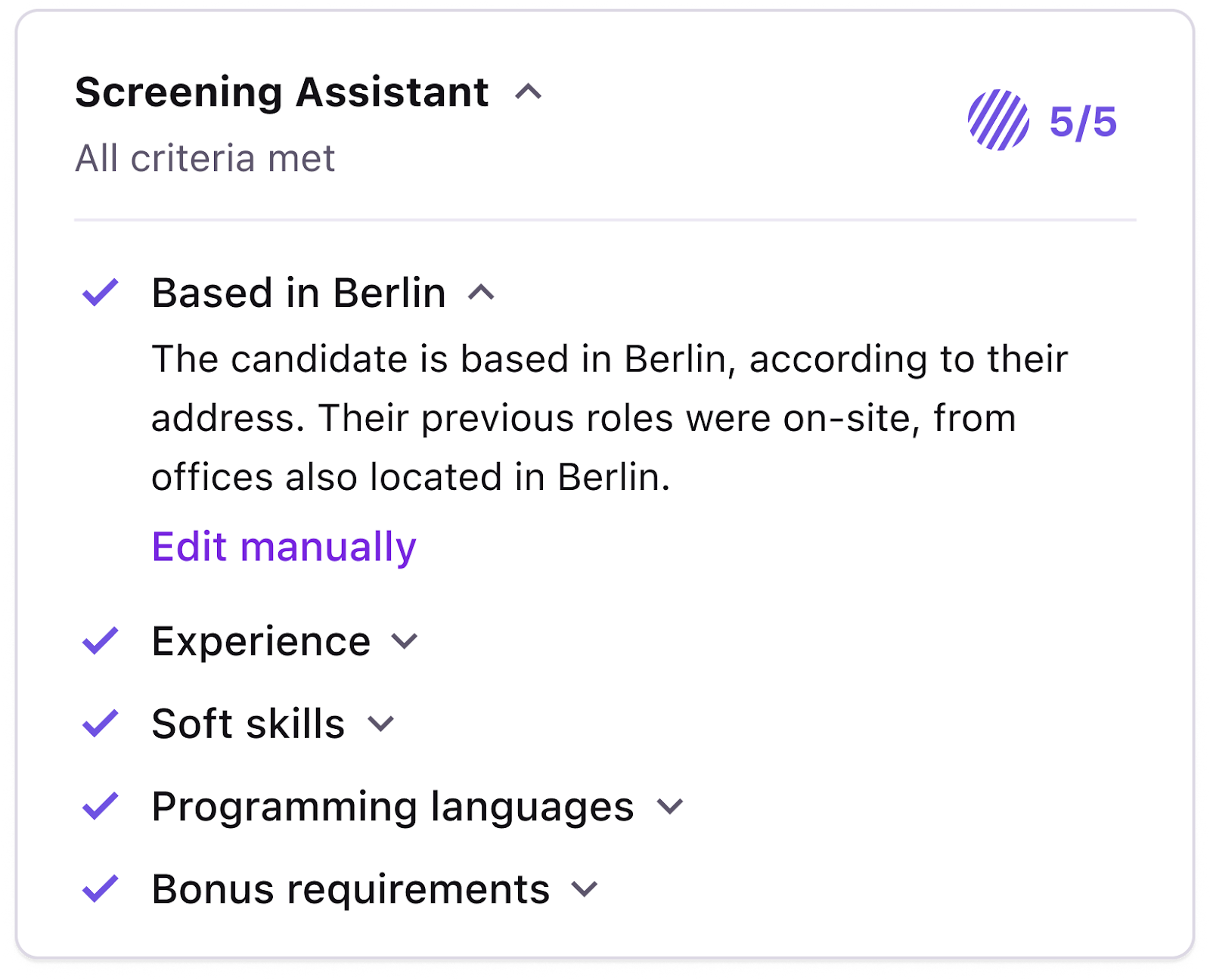
Screening Assistant in Tellent Recruitee shows how candidate information relates to six specific criteria you define
This lets you quickly prioritize candidates who meet more requirements, therefore standardizing the first review step in the screening process so recruiters can move faster and focus their attention on the most relevant candidates.
Note: Always use human judgment to double-check filtered candidates’ resumes and to decide who progresses to the next stage.
Dig deeper: How to screen candidates faster: A 7 step practical guide
7. How can you automate candidate communication?
Set up email templates with dynamic placeholders for personalisation, then automate messages to send automatically based on candidate status changes — so every applicant gets a timely, consistent update without adding to recruiter workload.
Recruiters handle multiple manual communication touchpoints throughout the hiring process, including:
- Application acknowledgments
- Initial outreach
- Interview scheduling and reminders
- Follow-ups
- Decision emails
- Offer letters
- Onboarding emails
With small teams taking an average of 36.5 days to fill a role, candidate communication needs to stay consistent for over a month, often across hundreds of applicants.
And that’s not a tradeoff growing teams can afford. When communication slips, your employer brand suffers, and top candidates are more likely to drop off mid-process.
The solution: Use email templates and automate communication.
Start by creating consistent message templates your team can reuse.
Either pull from templates for key touchpoints, including general communications, auto-confirmations when candidates apply, and interview invites, or make your own templates in Tellent Recruitee.
Custom templates also include dynamic placeholders to let you personalize messages at scale.
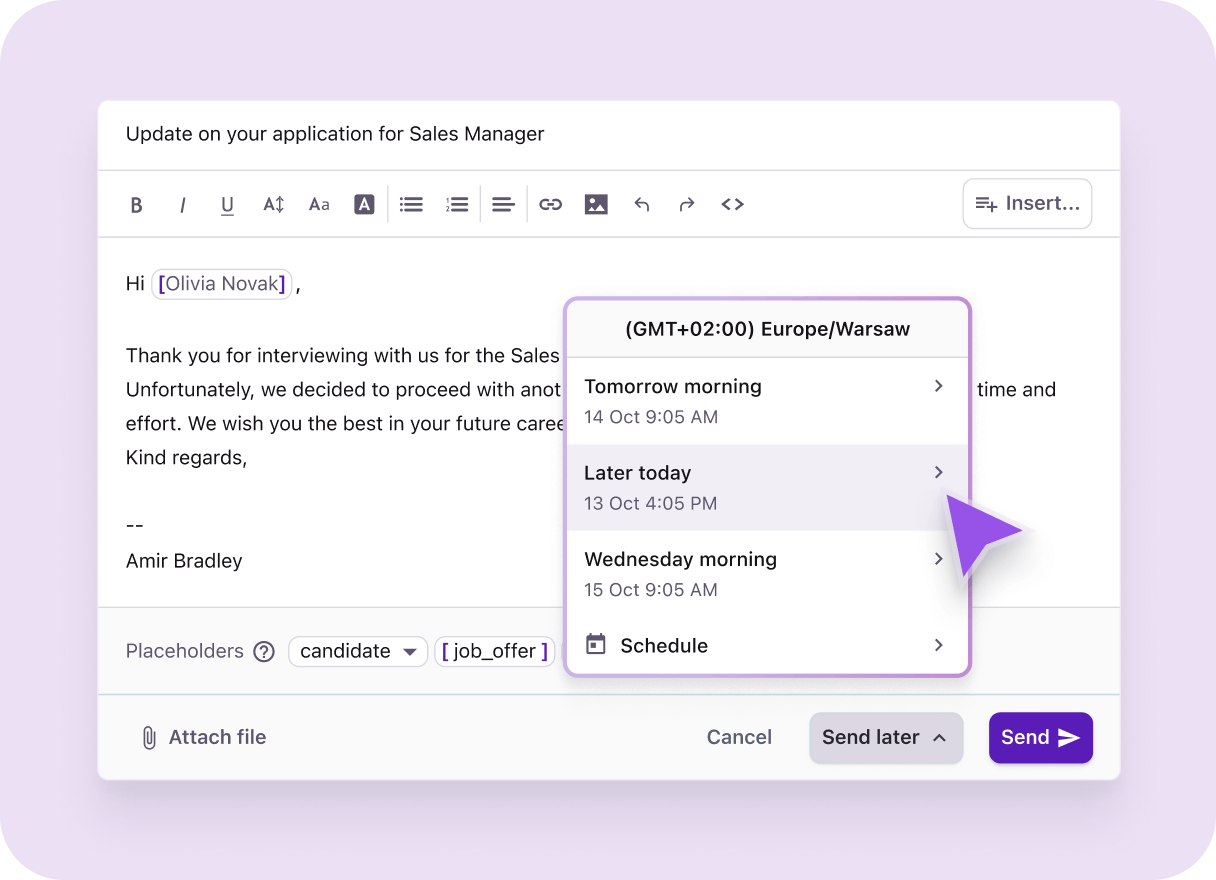
How to send emails at a later time in Recruitee
Then take it a step further and automate specific messages.
By automating emails — such as application confirmations and next step updates — you can send or schedule messages to go out at a specific time or based on candidates’ status changes.
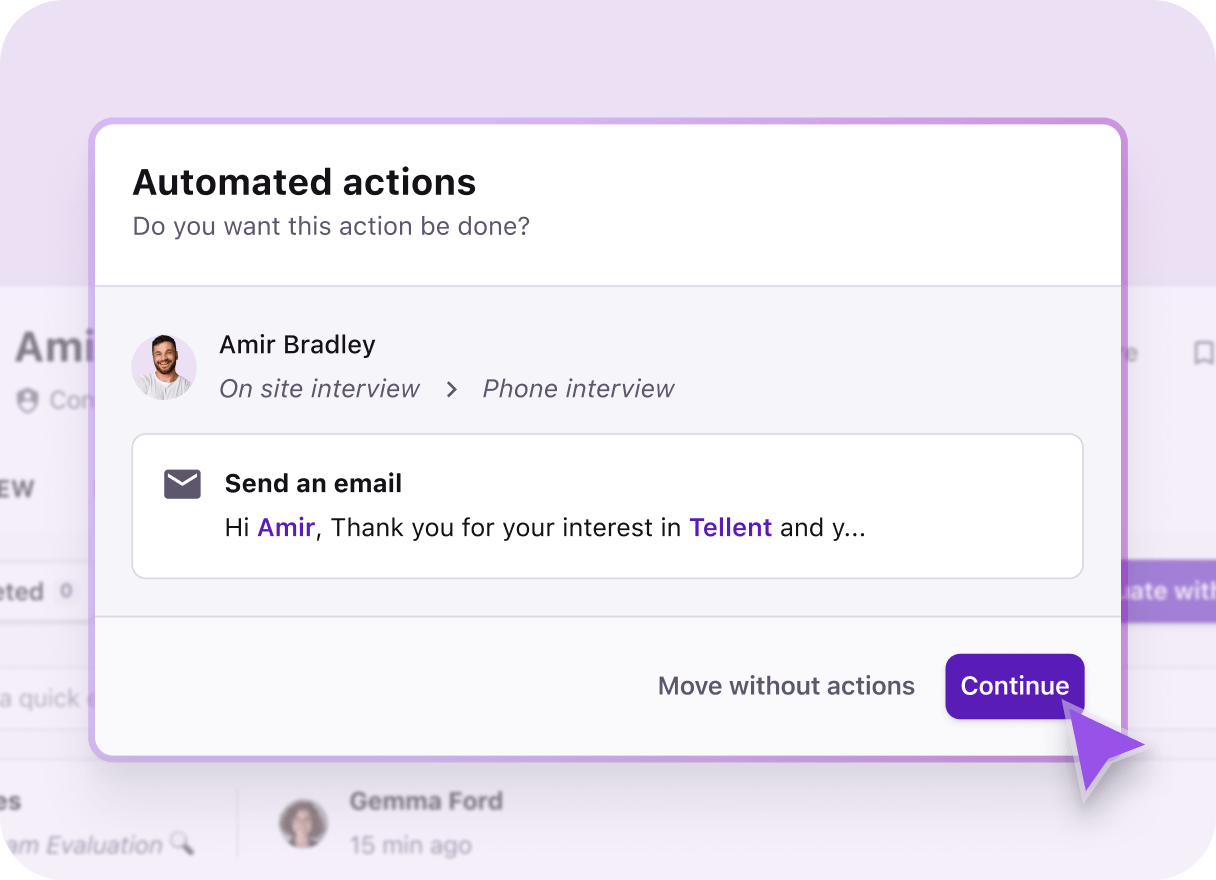
Trigger automated emails by automating actions in your pipeline
For example, set an automated rejection email to be sent when a candidate is marked as not passing the screening stage.
Automating candidate communication this way reduces manual follow-ups, ensures more consistent communication, and streamlines the hiring process — without increasing recruiter workload.
8. How do you automate interview scheduling?
Share a scheduling link with candidates and let them book directly into interviewers' calendars — removing the back-and-forth of manual coordination and reducing the risk of double bookings or missed updates.
Scheduling interviews between candidates and hiring managers can quickly turn into a game of calendar ping-pong.
By the time a candidate confirms availability, the hiring manager isn’t free or the other way around — often leading to rounds of back-and-forth emails before everyone agrees to a time.
Meanwhile, candidates may already be progressing with other employers, making slow interview scheduling a real risk of losing strong applicants.
Manual coordination also increases the chances of mistakes — from double bookings to missed updates.
To avoid this, automate interview scheduling. In Tellent Recruitee, this is built in with Event scheduler. It streamlines the process by helping you:
- Connect team calendars so availability is visible in one place
- Share scheduling links with candidates via email or text
- Let candidates choose a time that works for them on a dedicated booking page
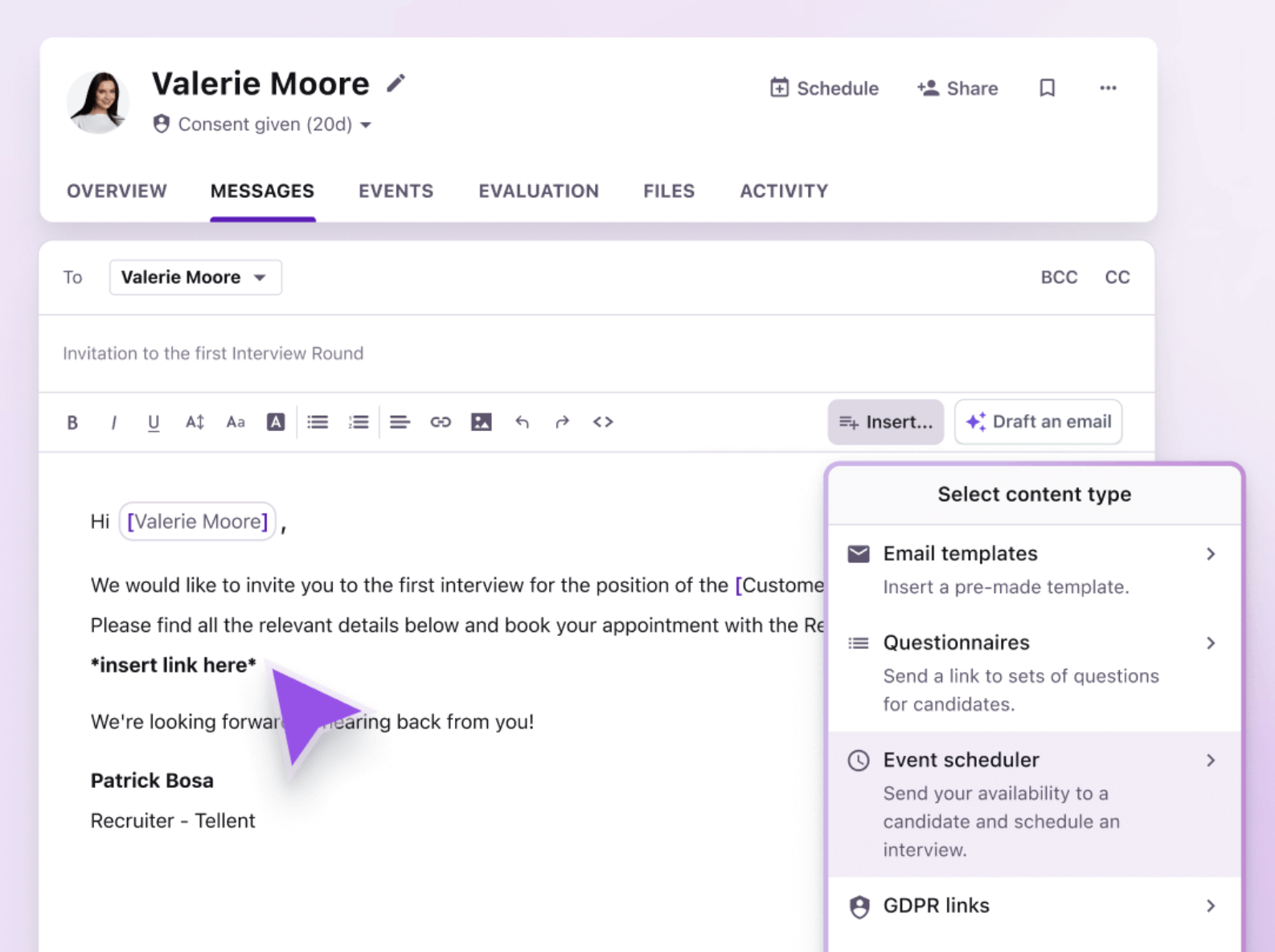
Connect team calendars and send interview scheduling links from your ATS
This removes the back-and-forth of manual scheduling, speeds up interview coordination, and lets you offer candidates a smoother experience.
9. How can you automate interview feedback collection?
Automatically trigger feedback requests and reminders when a candidate moves to a new pipeline stage — so hiring managers know exactly what's needed and when, without recruiters having to chase manually.
When interview feedback moves slowly, hiring decisions stall — leaving candidates waiting. That impact compounds quickly.
Companies with hiring cycles longer than 40 days see a 12% increase in candidate drop-off. Meaning: slow feedback doesn’t just slow hiring — it risks losing strong candidates altogether.
Yet, in many teams, recruiters still chase hiring managers for interview feedback across Slack messages and emails — making this another task to automate.
By using an ATS to gather feedback, you not only create a central place for managing candidate evaluations, but you can also automatically trigger feedback requests and reminders.
So, for example, when a candidate moves to a new stage in the hiring pipeline, you can trigger the system to automatically send evaluation requests to the relevant interviewers — complete with feedback submission deadlines.
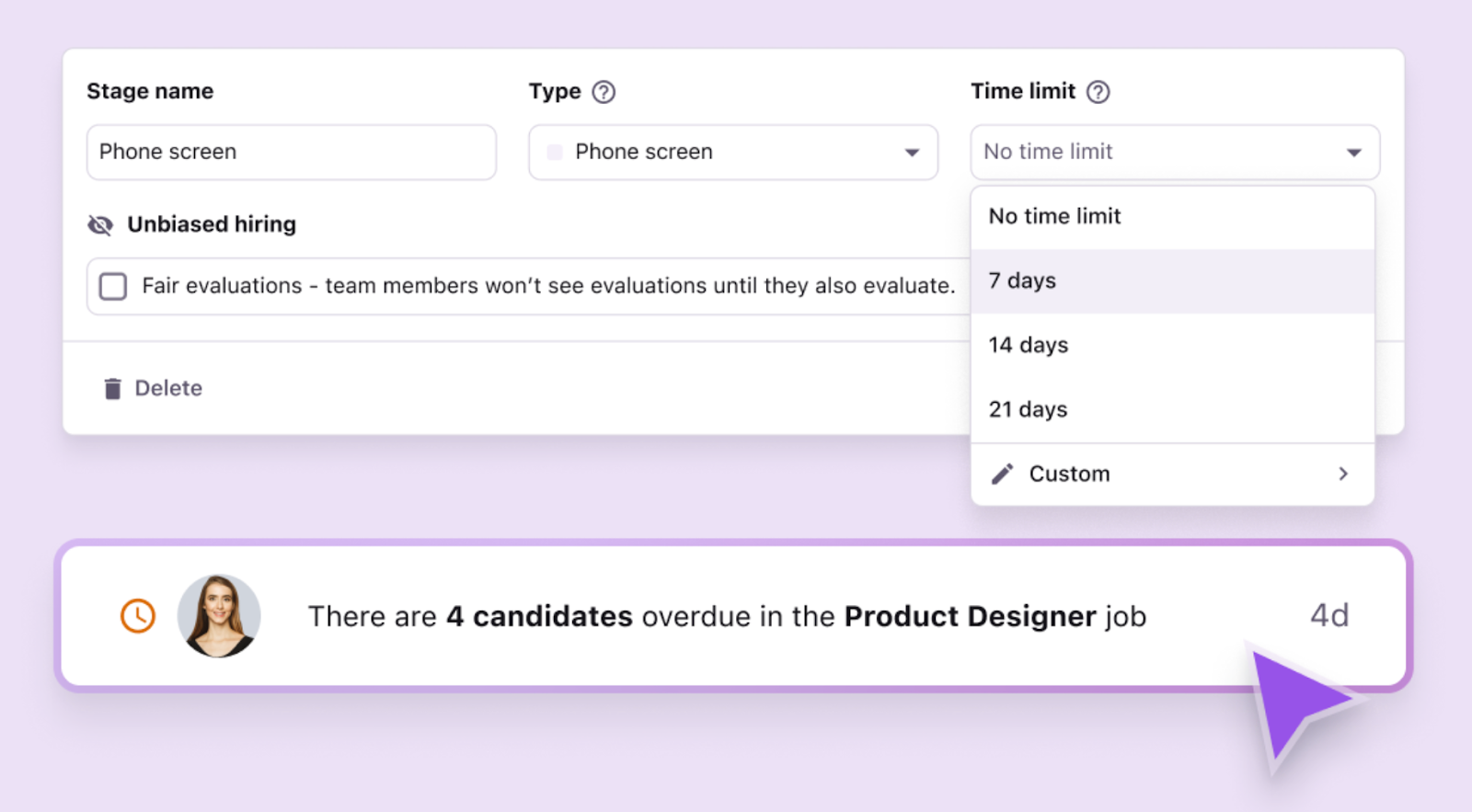
Set automated interview feedback requests with deadlines in Tellent Recruitee
The hiring team can also just visit their dashboard to see all pending evaluations they’re responsible for.
This keeps feedback visible and on track, helping recruiters move candidates through the hiring process faster and reducing time-to-hire.
Dig deeper: How to get your hiring team to give interview feedback faster
10. How can you automate recruitment reporting?
Track all recruitment metrics inside your ATS so hiring data is collected and updated automatically in one place — giving recruiters, hiring managers, and stakeholders instant access to the numbers they need, without manually pulling data from disparate sources.
For many teams, hiring data is scattered across spreadsheets and multiple tools — often buried under layers of permission.
So when it’s time to report on hiring performance or evaluate your recruitment strategy, pulling this information together becomes time-consuming and frustrating.
That’s why automating recruitment reporting matters.
Instead of manually pulling numbers from disparate sources, track recruitment metrics in your ATS so the system automatically collects and updates hiring data in one place.
With the data shown in easy-to-understand dashboards, recruiters, hiring managers, and other stakeholders can quickly access the metrics they need.
Most ATS platforms give you reporting templates or customizable dashboards to track the recruitment metrics that matter most.
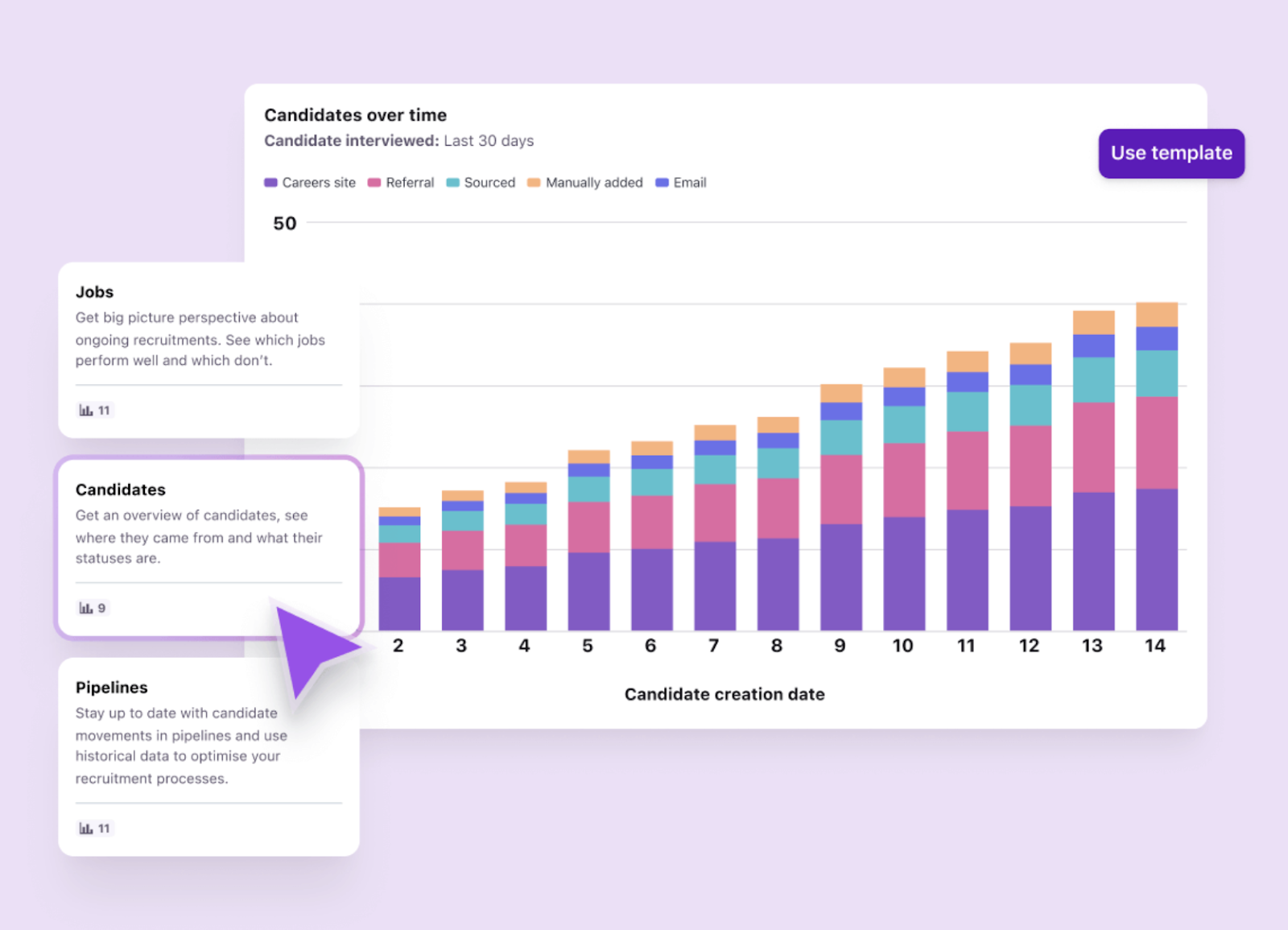
Reporting in Tellent Recruitee
This gives recruiters and hiring leaders a clear view of hiring performance, helping teams spot bottlenecks, track progress, and ultimately, improve their recruitment process.
Is it worth automating manual tasks in recruitment?
Yes — automating manual recruitment tasks helps teams move faster, keep candidates engaged, and make better hiring decisions, without increasing recruiter workload. In fact, 94% of Tellent Recruitee customers report significantly fewer manual recruitment tasks after adopting the ATS.
The best place to start is the tasks consuming the most time in your current process. Even targeted improvements — like automating interview scheduling or candidate communication — can free up hours every week.
Want to see how these automations work in practice? Get a quick 30-min demo to explore how your team can reduce hiring admin and focus more on finding the right people.

.jpg?width=1000&name=%5BEN%5D%20Recruiting%20automation%20-%20Website%20image%20-%201220x740%20(1).jpg)