



.webp)

Recruitment metrics turn hiring from guesswork into a measurable, repeatable process you can confidently stand behind with leadership.
Instead of reacting to delays, candidate drop-offs, or poor hires after the fact, tracking the right metrics shows you exactly:
- Where your process is slowing down
- Where candidate quality drops
- And where strong candidates are lost
They also help you identify bottlenecks, refine your sourcing and screening approach, and improve hiring outcomes over time.
Plus, they give you a clear, data-backed way to explain what’s working, what isn’t, and where to focus next — so your decisions aren’t based on instinct, but on evidence.
That is what makes recruitment metrics strategic. They do not just show what happened in the hiring process; they help teams decide what to improve next. When used well, metrics give recruiters, hiring managers, and leadership a shared view of hiring quality, process health, and where action is needed — so hiring decisions become more consistent, explainable, and connected to business outcomes.
With so many hiring metrics you could be monitoring, it’s easy to track everything and improve nothing.
So to make it practical for you, we’ve grouped the most important recruitment metrics by the problems they help you diagnose — from slow hiring and low-quality applicants to conversion gaps, rising costs, and channel performance.
By the end, you’ll leave knowing which metrics matter most for your current hiring challenges. Let’s dive in:
TL;DR: Metrics to track based on your hiring challengeThe best recruitment metrics are not the ones that create the most detailed dashboard. They are the ones that help your team make better decisions.
|
How recruitment metrics improve decision quality
Recruitment metrics are most useful when they help teams move from hindsight to action.
A dashboard can show that time to hire is increasing, but decision guidance starts when the team can see where the delay happens, who owns the next step, and what needs to change. The same applies to candidate quality, offer acceptance, source performance, and hiring cost.
Used well, recruitment metrics help teams answer better questions:
- Which roles are getting stuck, and why?
- Where are strong candidates dropping out?
- Which channels produce hires that stay and perform?
- Are hiring managers evaluating candidates consistently?
- Where is the process creating avoidable cost, delay, or risk?
This turns recruitment reporting into a decision framework. Instead of tracking metrics in isolation, teams use them to improve how they attract, evaluate, select, and support new hires.
Recruitment metrics for a slow hiring process
If roles are staying open too long, candidates are dropping off mid-process, or hiring managers are slow to give feedback, the issue is rarely a lack of candidates. It’s usually bottlenecks inside your hiring process.
Track the following metrics to spot the bottleneck slowing recruitment:
1. Time to hire
Time to hire measures how long it takes to move a candidate from application to offer acceptance.
According to Tellent's State of Hiring 2025 report — based on data from over 5,000 companies — the global average time to hire is 40.1 days. For larger organizations with more structured processes, that drops to 28 days. With an average of 5.5 interviews per hire, many teams are running processes that are simply longer than they need to be.
It is the most direct indicator of hiring speed from the candidate’s perspective. A longer time to hire often means delays in screening, interview scheduling, feedback sharing, or decision-making.
How to track: Track application date and offer acceptance date in your Applicant Tracking System (ATS) — most systems calculate this automatically.
2. Time to fill/time to start
Time to fill (or time to start) measures how long it takes to fill a role from the moment it’s opened to when a candidate accepts or starts.
It reflects how quickly your team can respond to hiring needs and how long roles remain unfilled.
A high time to fill indicates slow talent sourcing, unclear requirements, or approval delays. Whereas, a low time to fill shows efficient hiring — assuming candidate quality is maintained.
How to track: Track job open date (after requisition approval) and offer acceptance (or start date) in your ATS.
3. Time per stage
Time per stage, or time in stage, measures how long candidates spend at each step of your hiring process.
It shows where candidates are getting stuck in your process — from screening to interviews or decision stages.
A high time in any hiring stage confirms bottlenecks in that stage, such as long candidate screening time or a long time to gather interview feedback.
How to track: Monitor from the date a candidate enters or is moved to a given stage to the date they are either rejected or moved to the next stage. Or to simplify this, use stage timestamps in your ATS to measure how long candidates spend in each pipeline step.
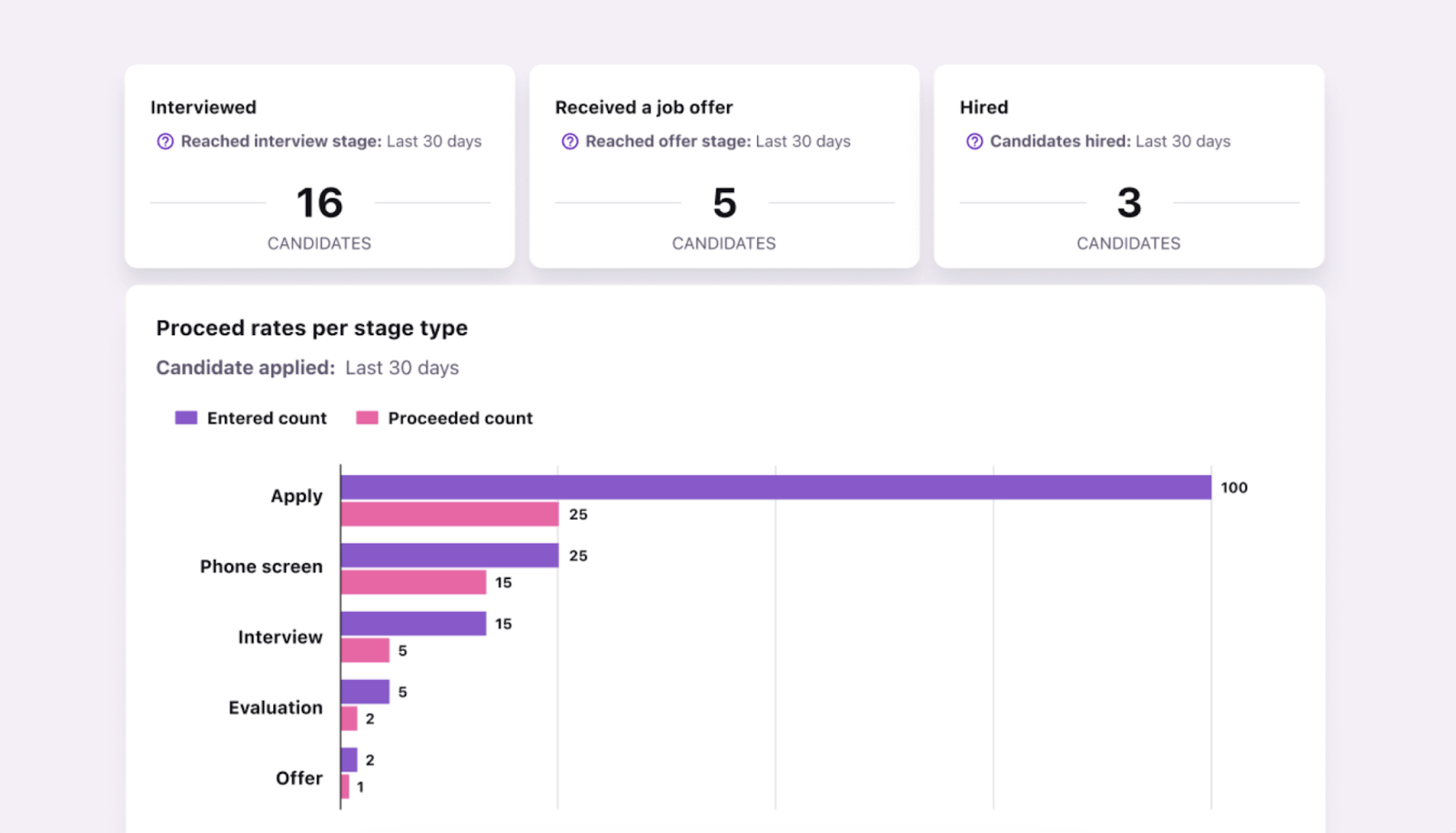
Measure time in stage in Tellent Recruitee.
4. Time to approve
Time to approve measures how long it takes to approve job requisitions or offers.
It shows where internal approvals are slowing hiring and increasing the risk of losing candidates.
How to track: Measure approval request and decision timestamps within your ATS or internal approval workflow.
5. Time to inform
Time to inform measures how quickly candidates are notified after a decision is made.
It reflects your responsiveness and directly impacts candidate experience. If it’s high, it shows poor communication between teams or manual overload on recruiters.
How to track: Track the time between decision status updates and candidate communication (email or system notification).
6. Time to disqualify
Time to disqualify measures how long it takes to reject candidates who aren’t a fit.
It shows how effectively your team filters out unqualified applicants — confirming the efficiency of your screening process and evaluation criteria.
How to track: Measure the time between the application date and the rejection stage in your ATS. In Tellent Recruitee, you can also track disqualifications per stage:
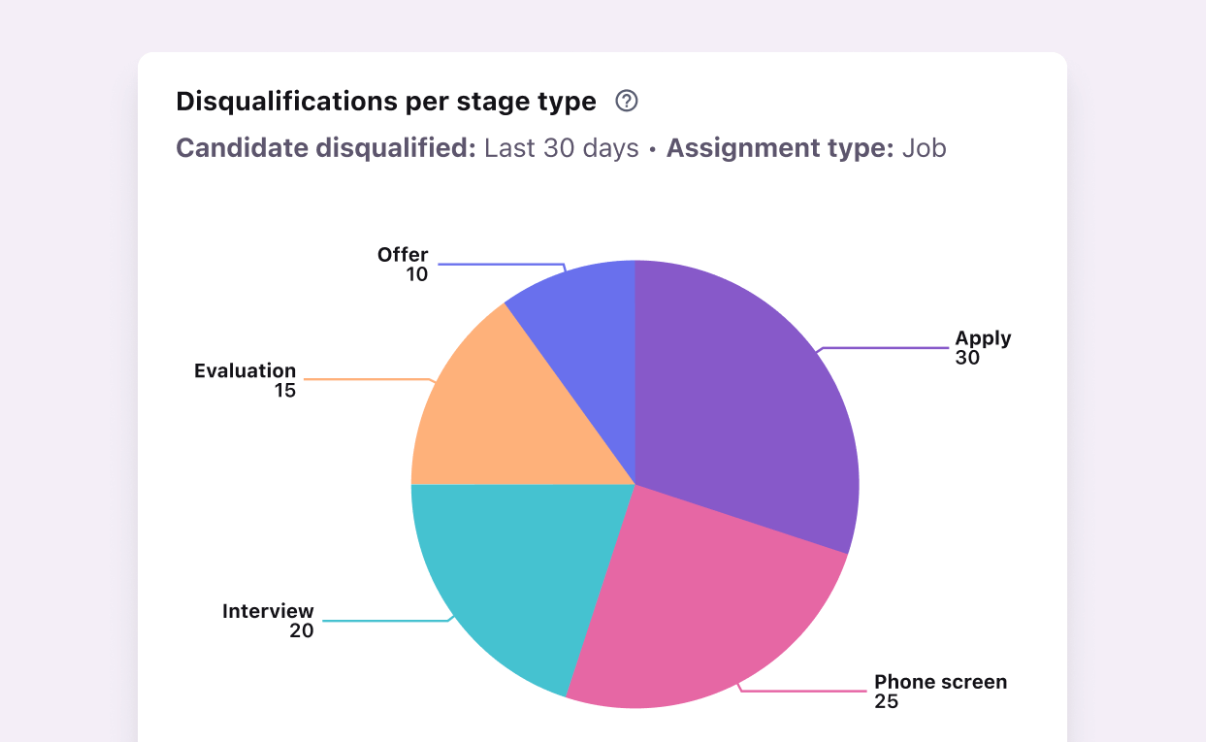
Analytics in Tellent Recruitee let you track and measure how many candidates you disqualify in each stage of your hiring process.
Recruitment metrics for low-quality applicants
If your team spends more time filtering candidates than evaluating them, or if most applicants are clearly unqualified, the issue is usually targeting, job clarity, or friction in your application process. Track these metrics to separate signal from noise:
7. Qualified candidates per role
Qualified candidates per role measures how many applicants meet your minimum requirements for each role.
It tells you whether your job targeting and messaging are attracting the right candidates.
If you’re consistently seeing a number of low-qualified candidates, review and optimize your talent sourcing strategy and job positioning.
How to track: Define qualification criteria, then track how many candidates meet those criteria or pass key screening stages for each role.
8. Screening pass-through rate
The screening pass-through rate measures the percentage of candidates who pass the initial screening.
It reflects the overall quality of your applicant pool at the top of the funnel.
A low rate here shows you’re attracting a large volume of unqualified applicants. Whereas a high screening pass-through rate indicates that you either have strong applicant quality or lenient screening.
How to track: Divide candidates who pass screening by total candidates screened using your ATS pipeline data.
9. Applications per job
Applications per job measure how many applications each job posting receives throughout the time that the position is live and advertised openly.
It reflects how visible and attractive your job listings are.
When there are few applications per job, this metric can help teams identify issues with the job description.
How to track: Measure total applications per job listing across your ATS or job boards.
10. Application completion rate
Application completion rate measures the percentage of candidates who finish the application process.
It highlights how easy (or difficult) it is for candidates to apply. A low application rate shows friction in your application forms, length, or mobile experience.
The scale of the problem is significant: Tellent's State of Hiring 2025 report found that more than 40% of applications are abandoned before submission — meaning nearly half of interested candidates never make it to "apply."
How to track: Use your ATS to track how many applicants start versus complete filling out your application form.
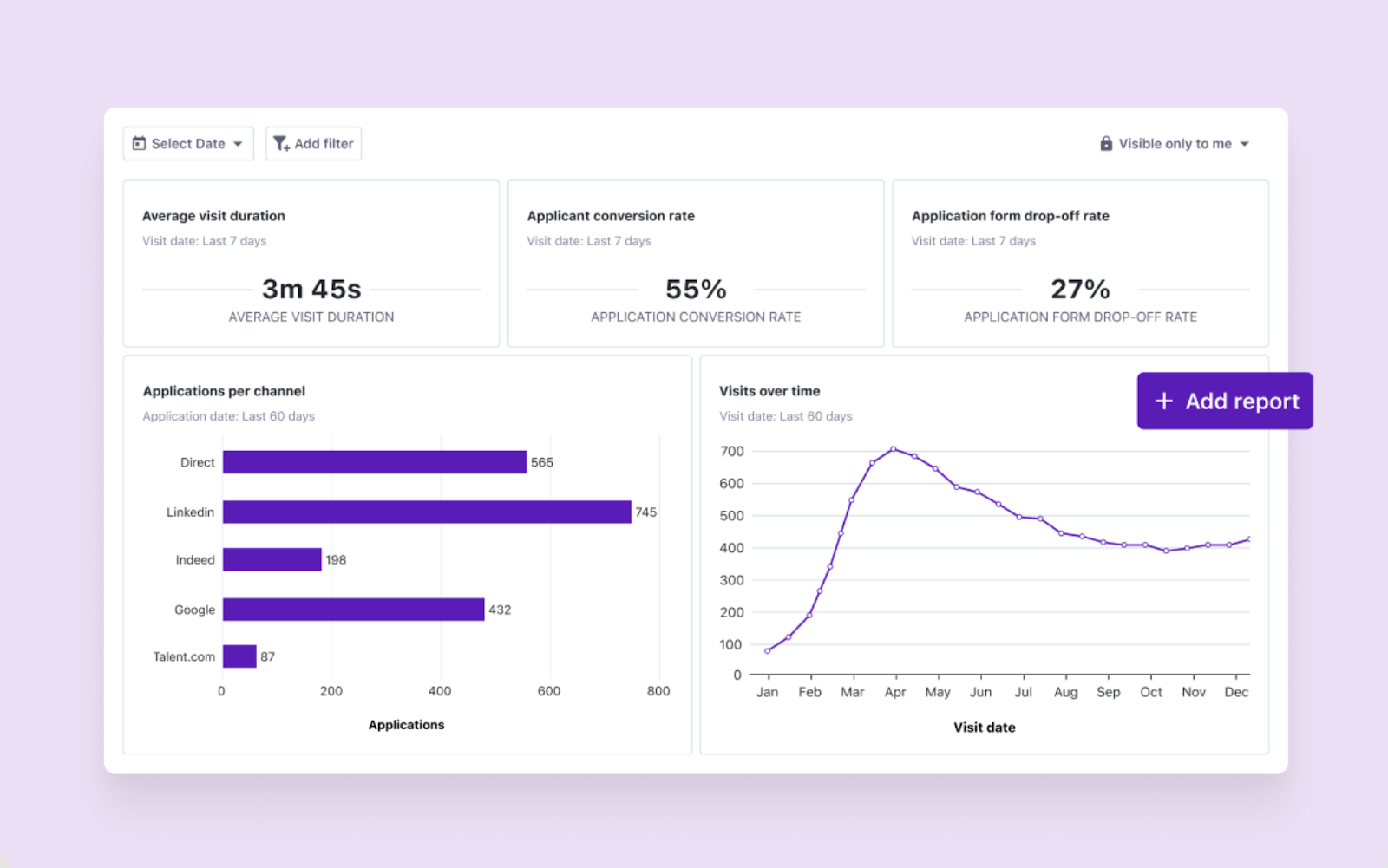
Use easy-to-read dashboards to track recruitment metrics such as application conversion rate, drop-off, and applications per channel.
Recruitment metrics for poor candidate conversion
Tellent's State of Hiring 2025 data shows stark regional differences in how well career sites convert visitors into applicants: fewer than 1 in 20 visitors apply in Benelux and DACH, compared to over 1 in 10 in France and globally.
If candidates are dropping out after interviews or declining offers, the problem usually sits in the later stages of the hiring process — decision speed, compensation, or candidate experience.
Monitor these metrics to determine where exactly you’re losing qualified candidates:
11. Offer acceptance rate
Offer acceptance rate measures the percentage of offers accepted by candidates.
It shows how competitive your offers are and how candidates perceive your process. A low offer acceptance rate indicates poor candidate engagement, compensation gaps, or slow processes.
How to track: Divide accepted offers by total offers sent, using offer status data in your ATS.
12. Conversion rate by stage
Conversion rate by stage measures how many candidates move from one stage to the next.
It highlights where candidates drop off in your hiring funnel.
How to track: Track how many candidates move from one stage of your hiring pipeline to the next (e.g., screening → interview, interview → offer).
13. Candidates per hire
Candidates per hire measures how many candidates you need to evaluate to make one hire.
It shows how efficient your sourcing and screening are.
Keep in mind, in some businesses, candidates per hire can remain high due to the nature of the positions or candidate markets.
How to track: Divide the total number of candidates considered by the total number of successful hires made over a set period.
14. Time to accept
Time to accept measures how long it takes candidates to accept an offer.
The clock begins when the business approves the offer and stops when the candidate formally accepts it.
It shows how confident candidates are in your offer — and whether you’re adequately addressing concerns regarding the position, salary, benefits, or other vital details before the offer stage.
How to track: Track the time between the offer sent date and the acceptance date in your ATS. This is best done by analyzing pipeline stages, specifically by monitoring the time spent in the “Offer” stage in your recruitment pipeline.
15. Contact rate
Contact rate measures the percentage of candidates who respond to your outreach messages.
It reflects how effective your outreach and targeting are.
A high contact rate shows relevant outreach and a strong employer brand, whereas a low contact rate indicates poor targeting or ineffective messaging.
How to track: Divide candidate responses by total outreach attempts (email, LinkedIn, etc.) tracked using your sourcing tools. Segment by channel, role, or message type to identify which approaches drive higher response rates.
16. Submission to acceptance rate
Submission to acceptance rate measures how many candidates submitted to the hiring manager go on to accept an offer.
It shows whether recruiters are sending well-qualified candidates and how aligned hiring expectations are early in the process.
How to track: Divide the number of accepted offers by the number of candidates submitted to hiring managers over a set period. By segmenting your submission to acceptance rate by role, team, or source, you can also identify where acceptance drops.
Recruitment metrics for rising hiring costs
If hiring feels expensive or difficult to justify to leadership, the issue is usually a mix of inefficient channels or a lack of visibility into ROI. Track these metrics to connect hiring activity to cost and impact:
17. Cost per hire
Cost per hire measures the total cost required to hire an employee.
It gives you a clear view of how efficient your hiring process is from a cost perspective, including spend across tools, ads, and recruiter time.
How to track: Divide total recruitment costs (ads, tools, recruiter time, agency fees) by total hires over a set period. Because collecting necessary information can be difficult on a monthly basis, cost per hire is typically calculated on an annual or biannual basis.
18. Cost per channel
Cost per channel measures how much you spend to generate hires from each sourcing channel.
It helps you understand which candidate sourcing channels deliver the best return on investment, so you can invest in them accordingly.
How to track: Divide total spend per channel by the number of hires generated from that channel. Alternatively, use your ATS to monitor expenses across channels (job boards, agencies, and campaigns) to compare cost-per-channel and identify the most efficient sources.
Recruitment metrics for understanding hiring channels' performance
If you’re investing in multiple sourcing channels but can’t clearly identify which ones drive quality hires, you’re likely optimizing for volume rather than outcomes.
Monitor these metrics to identify which channels actually convert best:
19. Source of hire
Source of hire tracks the original source of each hired candidate.
It gives you a clear attribution baseline — showing where hires originate before comparing performance across channels.
How to track: Use job tracking links for each source you want to track.
20. Conversion rate by source
Conversion rate by source measures how effectively each channel turns applicants into hires.
It shows which sources bring in candidates who actually progress and convert — helping you identify high-quality channels.
How to track: Divide hires from a source by total applicants from that source.
21. Hires per channel
Hires per channel measures how many hires come from each sourcing channel.
It shows which channels are actually producing hires, not just a high number of job applications.
How to track: Count total hires attributed to each channel over a set period. Alternatively, tag applicants in your ATS to see where they come from..
22. Applications per channel
Applications per channel measures how many candidates apply through each sourcing channel.
It highlights which channels are driving the most applicants — giving you visibility into candidate volume (not quality).
How to track: Track application counts by source using your ATS or job board data.
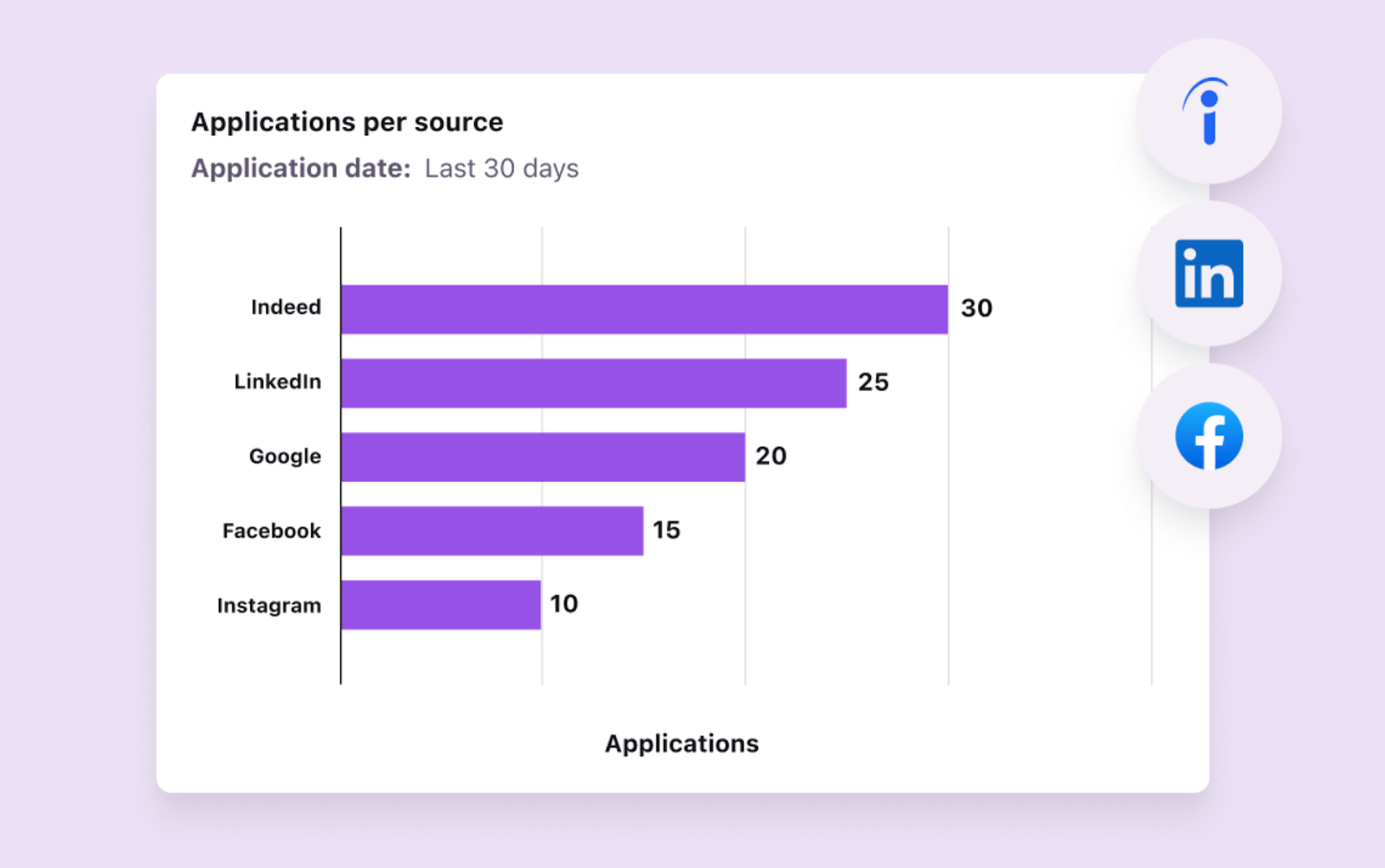
Tellent Recruitee shows you an aggregate of how many applications each job board and sourcing channel brings in.
23. Advertisement performance
Advertisement performance measures how well your job ads convert views into applications.
When tracking ad performance, review how both your paid ads and employer branding ads are converting.
How to track: Monitor clicks, views, and applications per job ad using job boards or analytics tools. Don’t forget to compare how many applications were generated as a result of ads. Then calculate your acquisition cost: how much was spent on the advertisement divided by the number of applications produced by the ad.
24. Social media metrics
Social media engagement metrics measure how your audience interacts with your job posts across social platforms.
It shows whether your social channels are actually generating interest and engagement from potential candidates.
How to track: Use in-build social media platform analytics to track clicks, shares, and engagement on job-related posts. Below are the recommended recruitment metrics for the three main social channels:
- LinkedIn: social engagement and impressions
- Facebook: post engagement and reach
- Twitter: Tweet impressions and profile visits
Remember to collect and compare social metrics in the same time frame (i.e., month, quarter, or year).
Recruitment metrics for improving long-term hiring outcomes
Filling roles is only part of the goal. A hiring decision continues to create impact after someone joins — through onboarding, performance, development, engagement, and retention.
If new hires underperform or leave early, the root cause is often visible earlier in the hiring process: unclear criteria, weak role alignment, poor candidate experience, or rushed decision-making.
These metrics help you assess whether your hiring decisions are actually working over time, not just whether roles are being filled.
25. Quality of hire
Quality of hire measures whether new employees perform, stay, and contribute successfully after they join.
It connects recruitment activity to long-term business impact by showing whether hiring decisions lead to strong outcomes beyond the offer stage. Unlike speed or cost metrics, quality of hire helps teams understand whether they are selecting the right people, not just moving candidates through the funnel efficiently.
How to track: Combine post-hire indicators such as hiring manager satisfaction, probation outcomes, performance ratings, retention at 6 or 12 months, and time to productivity. For a more complete view, segment quality of hire by source, role, hiring manager, or assessment method.
26. Retention rates
Retention rates measure the quality of hire, indicating whether your hires stay and perform over time.
It reflects how effective your hiring decisions are — whether they lead to strong candidates that contribute to company growth and long-term success.
Poor retention rates generally indicate a number of recruitment-related issues, such as poor candidate selection, insufficient onboarding, and unsatisfactory working conditions.
How to track: Measure in time blocks and monitor the number of hires (that start work at your company) and record how many of these new starters are still working with you six months later, a year later, and so on. By segmenting retention rates by exit reason, you can better identify where issues occur in the hiring process.
27. Candidate experience
Candidate experience measures how candidates perceive your hiring process.
It reflects the quality of your hiring experience and its impact on your employer brand.
How to track: Collect feedback using post-process surveys (e.g. candidate NPS (Net Promoter Scores) and questionnaires). Make sure to approach both successful hires and unsuccessful candidates, asking them questions about quality, speed, and communication.
28. Talent pool growth
Talent pool growth measures the increase in qualified candidates added to your candidate database or pipeline over time.
It reflects how effectively your candidate relationship building, talent sourcing, and employer branding efforts are building a steady pipeline of relevant candidates for future roles.
How to track: Monitor the number of new qualified candidates added to your talent pool over a set period (e.g., weekly or monthly), and segment by source or role. Monitor growth trends over time to identify which channels and approaches consistently attract relevant candidates.
How to measure recruitment metrics (without the manual overload)
Tracking recruitment metrics isn’t just about collecting data — it’s about making sure that data is accurate and actually usable.
If your tracking setup is inconsistent, even the right metrics will lead to the wrong conclusions.
Here’s how to make your recruitment metrics reliable:
1. Use your ATS as your single source of truth
Your metrics are only as reliable as the system they come from.
Centralize all hiring activity in an Applicant Tracking System (ATS), not across emails, spreadsheets, or Slack. This gives your team a trusted foundation for recruitment data: candidate stages, timestamps, feedback, sources, offers, and hiring outcomes.
But an ATS should not only store data. It should help teams turn that data into guidance — showing where candidates are stuck, where feedback is missing, which sources are converting, and where the process needs attention.
This makes it easier to track recruitment metrics with consistent data and reporting, while avoiding duplicate data and fragmented workflows that lead to unreliable decisions.
2. Standardize your hiring stages
Most reporting issues come from inconsistent pipeline stages. You’ll want to:
- Define clear stages (e.g., application, screening, interview, offer)
- Keep stage definitions consistent across all roles
- Avoid creating one-off or custom stages per job
If stages aren’t standardized, metrics like time in stage and conversion rates won’t be comparable.
3. Align on metric definitions across your team
Different interpretations of the same metric can easily create confusion. So make sure you:
- Agree on definitions like time to hire vs time to fill
- Define what counts as a “qualified candidate”
- Standardize how conversion rates are calculated
Without alignment, your reports would be hard to trust, especially by leadership.
4. Capture data at the right moments
Recruitment metrics rely on accurate timestamps. Make sure your ATS consistently records:
- Application date
- Stage entry and exit dates
- Offer sent and accepted dates
Missing or delayed updates lead to distorted metrics, especially for time-based tracking.
Avoid common tracking mistakes
Even with the right setup, small issues can quietly skew your data and make your metrics hard to trust. Watch out for:
- Candidates not being moved between stages. If candidates sit in the wrong stage, time-based metrics (like time in stage or time to hire) become inaccurate. Make it a habit to update stages immediately after each step.
- Duplicated candidate records. Multiple profiles for the same candidate distort pipeline counts and conversion rates. Use your ATS’s duplicate detection to flag potential duplicate candidates, then regularly review and merge profiles.
- Tracking application volume but not conversions. High application numbers don’t mean your process is working. Always pair volume metrics with conversion rates to understand quality and progression.
These issues often go unnoticed because the numbers still “look right” — but they lead to misleading insights and poor decisions over time.
Summing up: Turn recruitment metrics into better hiring decisions
Tracking recruitment metrics is not about building bigger dashboards. It is about improving how your organization makes hiring decisions.
The teams that see the most impact focus on a small set of metrics tied to the problem they are solving — whether that is slow hiring, low-quality applicants, candidate drop-off, rising costs, or unclear source performance.
Once you have identified the right metrics, use them to take action:
- Fix bottlenecks where candidates are getting stuck
- Refine job descriptions and screening criteria to improve applicant quality
- Adjust offers and processes to reduce candidate drop-off
- Compare channels based on quality and outcomes, not just volume
- Connect hiring metrics to post-hire outcomes such as onboarding, performance, and retention
Done right, recruitment metrics become more than reports. They serve as a guidance layer for better hiring, helping recruiters, hiring managers, and leadership understand what is happening, where to focus, and how to make more consistent, evidence-based people decisions.


.jpg?width=1000&name=%5BEN%5D%20Recruiting%20automation%20-%20Website%20image%20-%201220x740%20(1).jpg)