


.webp)
When people talk about recruitment automation, the conversation usually stays surface-level: we automated X, it saves us Y hours. That framing is true, but it misses the more interesting question — how do you automate in a way that makes your process better for candidates, not just faster for your team?
At Tellent, we've built our recruiting process on top of Tellent Recruitee's automation features, and I've spent a lot of time thinking through not just what to automate, but why, where to add friction on purpose, and where to keep a human firmly in the loop. What follows is an honest look at how that setup works in practice — the thinking behind it, the things we iterated on, and what's made the biggest difference.
What you'll learn:
-
How to set up automation that filters out ineligible candidates early, without sacrificing their experience
-
Why specific rejection reasons are the foundation of a data-driven recruiting process
-
How to build safeguards so automation mistakes don't reach candidates
-
Where to deliberately stop automating and why that line matters
-
Why "automated" and "warm" aren't opposites, and how to prove it
When to start thinking about recruitment automation
Before getting into the specifics of our setup, it's worth being honest about when automation actually makes sense. If you're hiring for one or two highly specialized roles a year, the time investment in building out a full automation system may not pay off immediately.
But if you're receiving over 100 applications per role — which is the reality for many teams, and certainly for us — automation stops being optional. At that volume, manually processing every application, writing every rejection email from scratch, and tracking every candidate's status by hand isn't just inefficient. It means the candidates who deserve your attention aren't getting it, because your time is absorbed by repetitive tasks that a well-built system could handle.
That's the frame I'd encourage any people leader to start with: automation isn't about replacing human judgment. It's about protecting the time and attention that human judgment requires.
One note if you're operating in the EU: depending on your setup, automated candidate screening and rejection workflows may fall under the EU AI Act's high-risk category for employment tools. If you're uncertain whether your configuration triggers compliance obligations, it's worth a conversation with your legal team before going live.
First contact: filtering out ineligible candidates early
The first place automation earns its keep is right at the top of the funnel, the moment someone applies.
For every role at Tellent, there are certain criteria that candidates must meet for us to move forward — for example, holding a valid visa to work in one of our entity countries, or meeting the language proficiency level required for the job, and communicating effectively within the team. We've deliberately limited knockout criteria to genuine, job-related requirements, since criteria based on nationality or origin carry a real risk of discrimination if applied loosely.
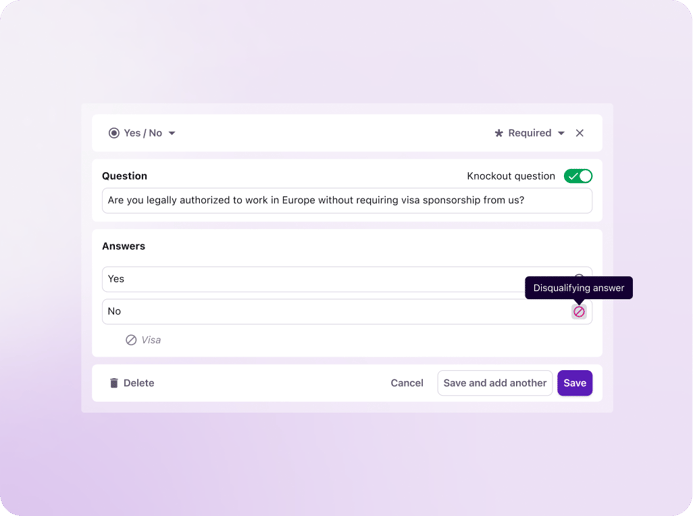
An example of a knockout question automation set up in Tellent Recruitee to filter out ineligible candidates
Without automation, a recruiter still has to open every one of those profiles, check the knockout question answers, and manually process the rejection. That's a meaningful time sink, and it delays the response the candidate deserves.
We've set up automations in Tellent Recruitee to filter candidates who answer knockout questions unfavorably. They receive a rejection email explaining the reason clearly, always with a built-in delay — more on that in a moment. The email also invites candidates to respond in case they answered incorrectly by mistake.
Importantly, the email also gives them an opening to reach out if something went wrong. I get these messages fairly often: someone accidentally indicated they don't have a valid work visa when they do, or misread a question. The delay is intentional — not to create a window for error-catching, but because an instant rejection simply doesn't feel humane. And by giving candidates the ability to respond directly, we make sure a genuine mistake never has to become a closed case.
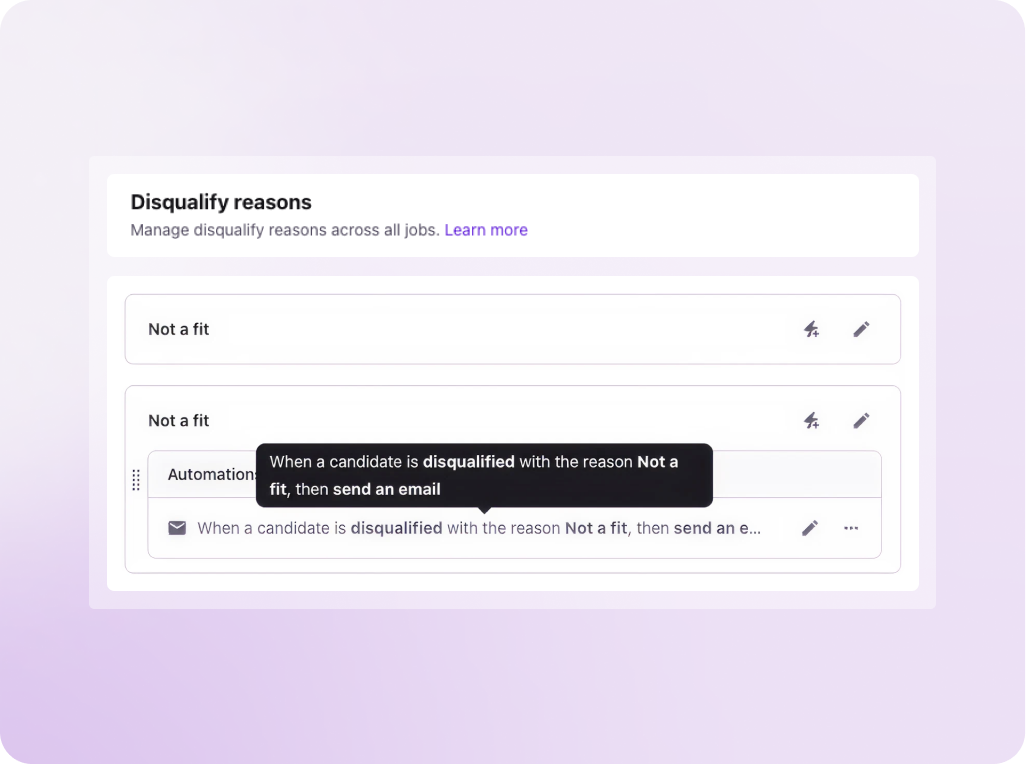
An example of a disqualification email automation in Tellent Recruitee — triggered automatically when a candidate is disqualified
This is one of the clearest examples of automation making a process more human, not less. Every candidate gets a response. Every response has a reason. And the system creates space for the kind of exceptions that a purely manual process would still miss half the time.
Keeping candidates informed as they move through the process
Once a candidate is in the process, one of the most underused automation opportunities is stage-to-stage communication. Every time a candidate moves forward, they should hear about it — but sending those updates manually for every candidate at every stage isn't realistic at volume.
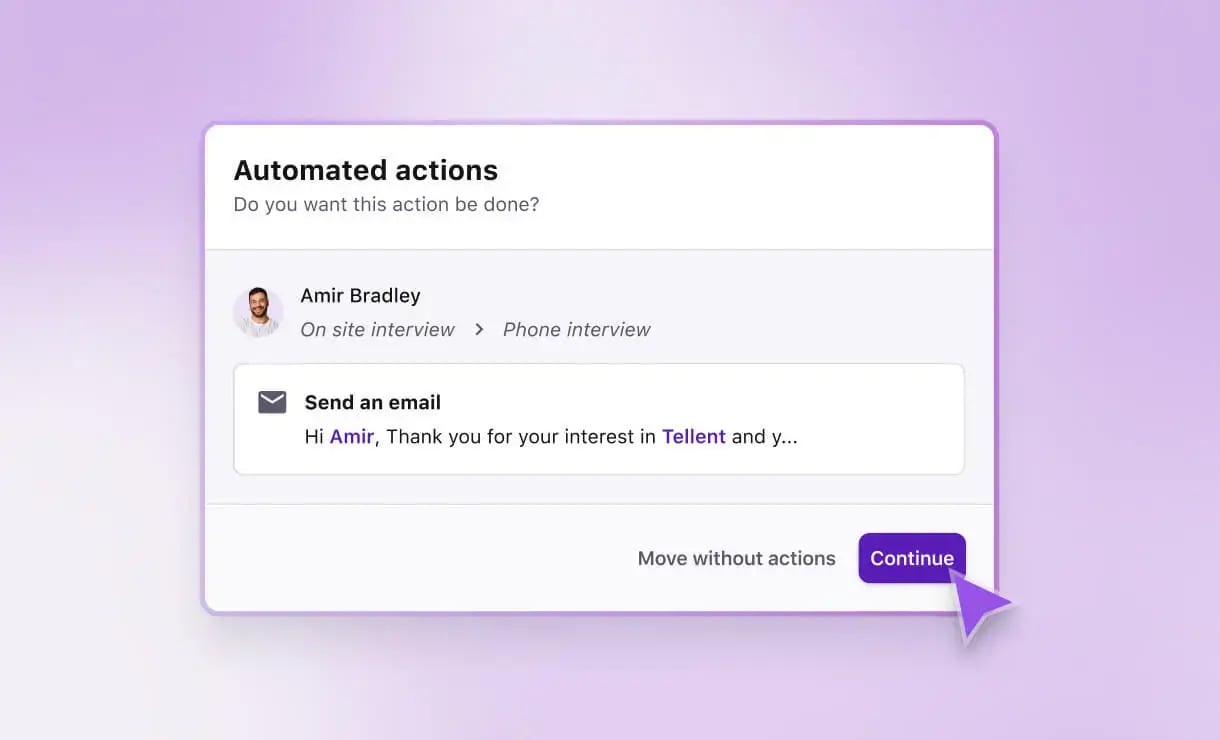
In Tellent Recruitee, we trigger automated emails whenever a candidate moves from one stage to the next. When someone progresses from initial screening to the first interview stage, they receive an email confirming this, explaining what to expect from the online assessment, and setting expectations for next steps. It's consistent, timely, and means no candidate is left wondering what's happening.
We also use internal automations on the same principle: when a candidate is moved to an interview stage, the relevant interviewers are automatically prompted to complete their evaluation forms. This keeps the process moving without someone having to manually chase each hiring manager for feedback after every interview — which, if you've worked in talent acquisition, you know is one of the great time sinks of the job.
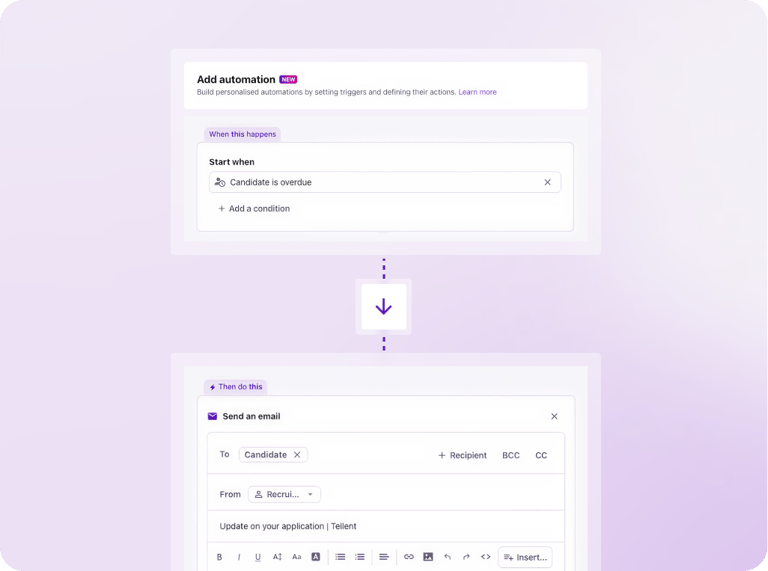
An example of a stage update automation in Tellent Recruitee — triggered automatically to keep candidates informed at every step
One feature I find genuinely useful here is that you can move a candidate to the next stage and set the automated email to go out with a delay. So I can make the decision and the update reaches the candidate a little later, which gives me time to add any candidate-specific context to the template before it's sent. The stage moves, the automation is queued, and I still have a window to add role-specific details or a personal note without having to write the message from scratch.
The one exception: once a candidate has been through an interview, any rejection is always written personally. Automation handles progression updates; it never handles the difficult news.
Build your rejection reasons before you build your automations
This is the step most teams skip — and it's the one that makes everything else work properly.
Before you configure a single automation, you need to map out exactly why you reject candidates. And you need to be far more specific than you think. At Tellent, we have roughly 20 distinct rejection reasons in Tellent Recruitee, each with two options: a manual template you can still customize, and an automated version that will be sent out after a set delay. Every time we open a role, those templates are already in place. We don't start from scratch.
The specificity isn't just good for candidates — it's the foundation of useful data. If you reject every candidate as "not a fit," you end up with nothing to report on. But if you're consistently choosing between "salary expectations outside budget," "insufficient seniority," "missing required certification," and a dozen other reasons, you start to see patterns that are genuinely actionable.
When I notice that a high proportion of applicants for a particular role are being rejected on salary grounds, that's a signal I can take to the business. Are we paying below market? Is the job description attracting the wrong pool of candidates? Should we revisit the budget before the next intake? That's a conversation I can have with data behind me, rather than a hunch. The rejection reason is the data-collection mechanism — it's just disguised as candidate communication.
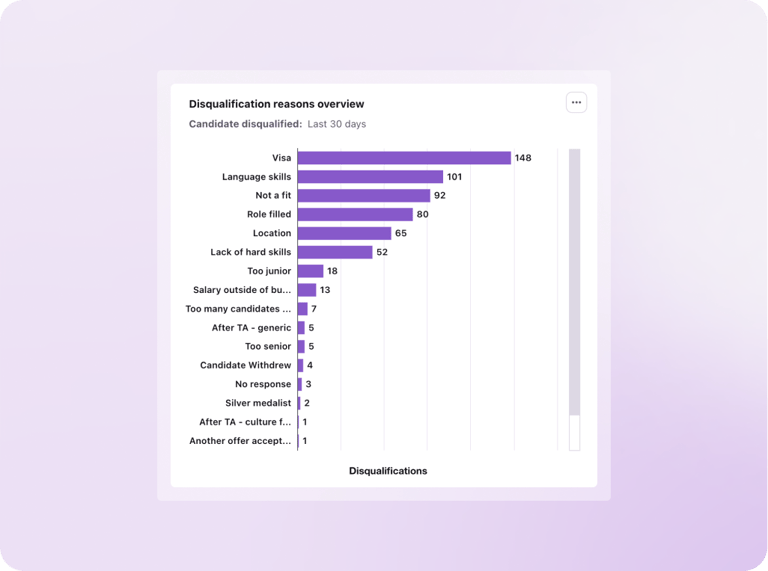
Disqualification reasons tracked in Tellent Recruitee — the kind of pipeline data that becomes actionable when rejection reasons are specific and consistent
Always build in a delay — and why it matters more than you'd think
Even when a decision is made quickly and fairly, an instant rejection can feel dismissive to a candidate — as if no one actually looked at their application. A short delay changes that perception entirely. It's a small configuration choice, but it has a real impact on how candidates experience the process, regardless of the outcome.
Adding a delay of one to two days does a few things at once. It makes the timing feel more considered, and it keeps the door open for candidates to reach out if they feel the decision was based on incorrect information — which, as I mentioned, does happen more than you'd expect.
There's another subtlety worth knowing: be mindful of how delays interact with weekends. If you reject someone on a Thursday with a two-day delay, that email lands on Saturday — which isn't ideal. It's the kind of operational detail that's easy to overlook when you're first setting up a system, but worth building into your logic from the start.
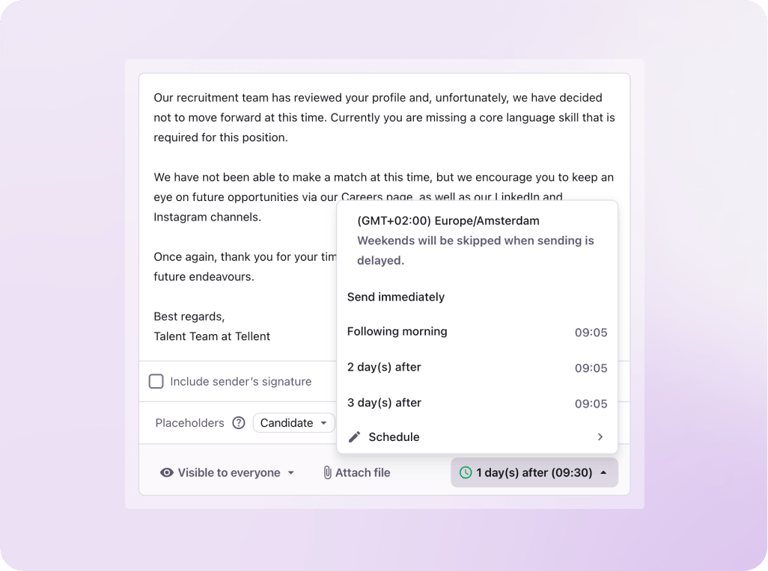
The send delay options available when configuring an automated rejection email in Tellent Recruitee — with weekends automatically skipped
Bulk rejections, done right
One area where the time savings become very concrete is bulk rejection workflows.
When we ran intake for a junior Talent Acquisition role, we received a high volume of applications and screened them all. Based on evaluation scores, a large portion were rejected for the same reason. Rather than processing each one individually, we bulk-rejected them with the appropriate reason in Tellent Recruitee, and the automation handled the rest — each candidate received the email corresponding to their specific rejection reason, with the appropriate delay.
That process, done manually, would have taken hours. Done through the system, it took minutes — and every candidate still got a specific, considered response rather than a generic "we've decided to move forward with other candidates."
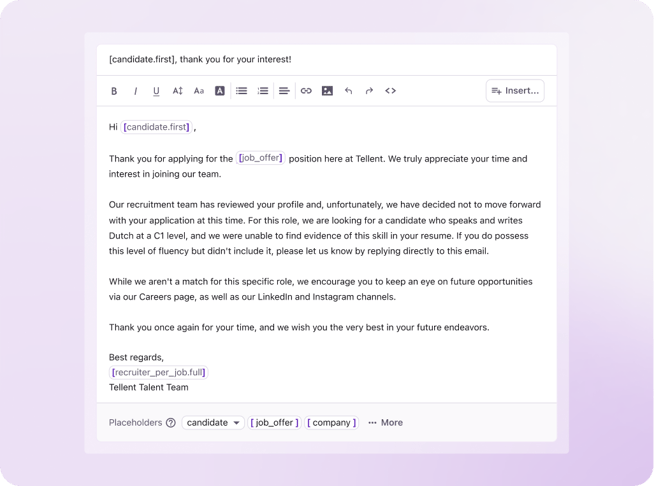
An example of a personalized rejection email sent at scale via Tellent Recruitee — specific to the candidate's rejection reason and written to leave the door open
This is where the upfront investment in building out detailed rejection reasons really pays off. The automation is only as good as the reasons behind it.
Safety nets: because automation mistakes happen
Automation introduces a specific kind of risk: an accidental action that fires before you realize something went wrong. A well-designed system needs built-in safety nets.
In Tellent Recruitee, you can configure automations to only trigger when certain conditions are met — for example, linking a rejection email to a specific evaluation score. So if you've set up an automation for a "too many candidates in the process" rejection, you can add a condition that it only fires if the candidate also has a negative evaluation score entered by the hiring team. If they somehow have a strong positive score, the automation won't fire, which is your signal that something needs a human review before anything goes out.
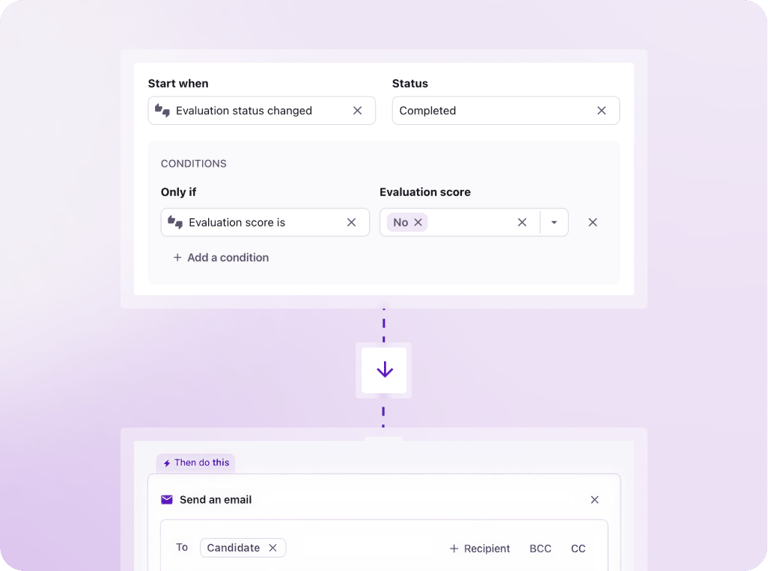
An example of a conditional automation in Tellent Recruitee — the rejection email only triggers if the candidate's evaluation score is negative, acting as a built-in safety net
We've also made a deliberate decision about who can reject candidates in our system. Hiring managers are not allowed to reject candidates directly. The reason is visibility: when a hiring manager rejects a candidate, that person moves to a rejected stage that's out of my primary view. I can no longer easily see what happened, whether they received an update, or what reason was recorded. The audit trail gets murky — and in the worst case, candidates get quietly removed from the process without ever hearing why.
By keeping rejection actions with the Talent Acquisition team, we maintain full visibility, ensure every candidate receives a proper response, and avoid the scenario where someone is effectively ghosted because a well-intentioned hiring manager clicks something without realizing the downstream consequences. If hiring managers need the ability to reject in your setup, ensure automations are configured so every rejected candidate still receives an update — the automated email serves as your safety net against ghosting.
Where we deliberately stop automating
Knowing where to stop is just as important as knowing where to start.
Our firm line is this: once a candidate has had an interview, rejection emails are never automated. They're written individually, every time. At that point in the process, a candidate has invested real time and energy — they've prepared, shown up, and shared something of themselves. A templated rejection doesn't do that justice.
In an ideal world, I'd call every candidate after an interview. In practice, that isn't always feasible. But the written feedback is always substantive — it addresses what went well and where the gap was. The goal is for candidates to come away having learned something, not just received a closure notice.
Why "automated" doesn't have to mean "cold"
The objection I hear most often from people who are hesitant about automation is that it'll make their process feel impersonal. I understand the instinct — good recruiters and talent acquisition professionals want to be personal, and that instinct is right. But impersonal and automated aren't the same thing, and I think it's worth separating them.
The investment you make upfront — carefully mapping your rejection reasons, writing templates that reflect your company's tone, and thinking through the candidate's experience at each touchpoint — is a one-time cost with ongoing returns. A well-written template for "salary expectations outside budget" is often warmer than a rushed manual email dashed off at the end of a busy day. The template had more thought put into it. It's just been systematized.
One signal I come back to often: I regularly receive emails from candidates thanking me for the feedback. Not just for the rejection itself, but for the specificity of the reason and for the fact that we responded at all. That last part always makes me a little uncomfortable — because responding to job applications should be a baseline expectation, not something candidates feel grateful for. But it's a useful signal that when automation is done thoughtfully, it can actually raise the bar for candidate experience rather than lower it.
We've also found that being transparent about rejection reasons — including salary — opens doors rather than closing them. When someone is rejected because their salary expectations are outside our budget, stating it clearly gives them the option to respond. Sometimes they do. And the candidates who don't fit now may be the right fit in 18 months, or they may refer someone who is. Rejected candidates who feel respected become advocates. That's worth building for.
The mindset shift that makes all of this work
Setting up a system like this takes real time upfront. But in my experience, the bigger barrier for most recruiting teams isn't the technical complexity — Tellent Recruitee's workflow automation is intuitive, and you don't need any technical background to work with it. The barrier is mindset.
Good recruiters want to be personal. They resist automation because they associate it with cold, generic communication. And that association isn't wrong — badly implemented automation does produce cold, generic communication. But the answer isn't to avoid automation. It's to build it carefully.
The way I think about it: I've caught myself doing the same thing over and over, writing essentially the same rejection email, choosing a rejection reason, sending it manually, and realizing I've spent 15 minutes per candidate on something a well-configured system could have handled in seconds. That's 15 minutes I'm not spending on a candidate who's a strong fit and deserves my full attention.
Automation handles the repeatable, predictable parts of the process. That's what frees up human attention for the decisions and conversations that actually require it. Block some time, experiment with what's possible, see what fits your company's specific needs — and then start applying it. The upfront investment is real, but it compounds.
What's coming next
One thing worth knowing: the automation capabilities in Tellent Recruitee continue to evolve.
Some of what's on the roadmap is directly aimed at one of the most persistent problems in recruiting — candidate ghosting. Features like automated alerts for candidate profiles that haven't been reviewed within a set number of days will make it even harder for candidates to fall through the cracks, regardless of how busy the team is.
It's an area I'm watching closely, because eliminating ghosting entirely is still a work in progress across the industry, and having the system flag it before it happens is a meaningful step forward.
Key takeaways
- Automation makes most sense at volume. If you're receiving over 100 applications per role, a well-built automation setup stops being optional and starts being a prerequisite for doing the job well.
- Build your rejection reasons first. They're not just a communication tool—they're a data-collection mechanism that feeds your pipeline reporting and business conversations.
- Always add a delay. Immediate rejections are a poor experience, and a delay gives you a buffer to catch and correct mistakes before they reach candidates.
- Safety nets are part of the system. Linking automation triggers to your team's evaluation scores and controlling who can reject candidates in your ATS prevents errors and maintains visibility.
- Draw a clear line at the interview stage. Once a candidate has spoken with your team, automation stops. Personal, specific feedback is non-negotiable at that point.
- Done thoughtfully, automation raises the bar — it doesn't lower it. The upfront investment in quality templates and well-mapped rejection reasons is what separates a process that candidates feel good about from one that feels cold.
Conclusion
Recruitment automation works best when it's built on a clear point of view about what candidates deserve at each stage of the process. The time savings are real — but they're a byproduct of getting the system right, not the goal in itself.
Start with your rejection reasons. Get specific. Write templates that reflect how your company actually communicates. Build in the delays and the safeguards. And be honest with yourself about where a human touch is irreplaceable — because that line is what makes the rest of the system credible.