



.webp)

High application volume sounds like a good problem to have. In reality, it often leads to resume overload, inconsistent shortlists, and slower hiring decisions.
But the real culprit isn’t volume, it’s structure.
When the screening criteria aren’t clearly defined and centralized, filtering becomes subjective and coordination slows.
The impact is measurable. According to our State of Hiring report, organizations with hiring cycles longer than 40 days see a 12% increase in candidate drop-off rates.
The solution? A structured screening process that helps you review hundreds of resumes efficiently and move qualified candidates to interviews faster.
In this guide, you’ll learn how to do just that as we dive into how to build a consistent candidate screening system that helps you:
- Reduce time to hire
- Improve candidate quality
- Lower the risk of costly mis-hires
TL;DR — Key takeaways:
|
Quick recap: What is the screening process in recruitment?
Candidate screening is the early stage of the hiring process where recruiters review and filter applicants against predefined role criteria to determine who should move forward to interviews.
The core stages of screening:
Most candidate screening processes break into three practical stages:
- Application filtering: Remove clearly unqualified applicants using minimum requirements and knockout questions.
- Pre-screening questions: Collect structured information upfront to assess skills, experience, and dealbreakers.
- Shortlisting screened candidates: Compare top applicants against defined criteria and decide who moves to the interview stage.
Benefits of a structured candidate screening process
An effective screening process helps you:
- Reduce time to hire by focusing interviews only on qualified candidates.
- Improve candidate quality through consistent evaluation criteria early on.
- Reduce costly mis-hires by filtering out unqualified candidates before they reach interviews.
- Align recruiters and hiring managers around what “qualified” actually means.
- Build a repeatable system that scales as hiring volume increases.
What does a strong candidate screening process actually look like
A strong candidate screening process doesn’t revolve around reviewing resumes alone. It’s a structured system that guides early hiring decisions — making sure every applicant is evaluated against clear criteria so screening stays consistent, fast, and fair.
In practice, it looks like this:
- Defined, role-specific qualification criteria for reviewing applications. Hiring managers and recruiters align upfront on must-haves, dealbreakers, and evaluation signals before reviewing applications.
- Candidate filtering with structured tools. For example, structured tools like knockout questions, AI screening, and standard evaluation guidelines help you review high volumes of applications faster and prioritize qualified candidates.
- Centralized feedback that’s quick and easy to access. Screening decisions and notes live in one system, so hiring teams can compare candidates objectively and move qualified applicants forward without delay.
When screening works this way, interviews become focused, decisions move faster, and hiring quality improves without adding more manual work.
Why does candidate screening break down in hiring teams?
Candidate screening typically breaks down when hiring volume increases, more stakeholders get involved, and the process isn’t clearly structured.
As teams grow, ad hoc screening practices that once worked start to create delays, inconsistent shortlists, and interview bottlenecks.
Common challenges in screening candidates include:
- Unclear qualification criteria. When the role’s must-haves and dealbreakers aren’t clearly defined upfront, screening becomes subjective. Recruiters rely on interpretation rather than agreed criteria, which weakens the quality of the shortlist.
- High application volume. As application volume grows, manual resume review becomes slow and reactive. Strong candidates get buried, and screening turns into guesswork instead of a structured evaluation.
- Inconsistent hiring manager input. When hiring managers join late or shift expectations mid-process, screening criteria change. Recruiters end up re-evaluating candidates or restarting the shortlist.
- Feedback delays. If screening decisions rely on email threads or Slack messages, feedback stalls. Candidates sit in limbo, and time to hire stretches unnecessarily.
- Disconnected hiring tools. When resumes, notes, and evaluations live across different systems, it’s hard to objectively compare candidates. Visibility drops, and decision-making slows.
- Lack of a structured screening process. Without defined stages, criteria, and workflows, screening becomes ad hoc. Every role feels like starting from scratch, which makes hiring slower as the company grows.
How to screen candidates faster
Screening candidates faster boils down to removing ambiguity, automating low-value tasks, and making early hiring decisions structured and consistent.
If your team is interviewing too many unqualified candidates or spending hours reviewing resumes, the fix isn’t “work faster.” It’s tightening your screening process.
Here are the seven practical steps to build a proactive screening process that reduces interview overload and shortens time to hire:
- Define qualification criteria before screening starts
- Add knockout questions to automatically disqualify candidates
- Use structured pre-screening questions to filter candidates early
- Use AI to screen resumes using consistent evaluation criteria
- Review AI-screened candidates using human judgment
- Standardize candidate screening across hiring teams
- Regularly track and improve your screening process effectiveness
Let’s get started.
1. Define qualification criteria before screening starts
Effective screening starts before applications pour in.
Align early on what “qualified” actually means for the open role(s). Clear criteria turn screening into a filtering system — saving time and improving candidate quality.
Here’s what to do:
Align with the hiring manager early
Before posting an open role, agree on:
- Non-negotiable must-haves
- Clear dealbreakers
- What “strong” looks like beyond minimum qualifications
Write this down so you’ve clear, agreed-upon guardrails from the beginning.
Kamila Kashayeva, the Talent Acquisition Partner at Tellent Recruitee likes to have pre-meetings with hiring managers to agree on the type of questions they want to ask candidates to determine fit.

By the end of this step, you should have clearly defined must-have and nice-to-have requirements grounded in role performance, not personal preference.
Use a simple qualification framework
Define screening criteria across four buckets:
- Role requirements: Certifications, location, work authorization, and core tools that the candidate must know how to use.
- Skills validation: Technical or functional competencies required to perform the job.
- Experience indicators: Level and scope of experience (for example, beginner vs. extensive), and relevant industry background
- Behavioral or team fit signals: Collaboration style, ownership mindset, communication patterns, or ability to work in cross-functional environments.
This keeps screening consistent and reduces guesswork.
Set a shortlist threshold upfront
Decide how many candidates move forward before you start reviewing.
For instance, shortlist the top 5-8 applicants who meet must-haves and score highest against your criteria.
This ensures you have a clear outcome from the screening process, preventing over-screening and keeping the process focused.
2. Add knockout questions to automatically disqualify candidates
Knockout questions are mandatory screening questions that filter out applicants who don’t meet a role’s minimum, non-negotiable requirements.
Instead of manually reviewing every application, knockout questions in your application form allow your Application Tracking System (ATS) to automatically disqualify unqualified candidates who don’t meet baseline criteria.
Here’s how:
Set up disqualifying reasons in your ATS
Before adding knockout questions, use the qualification criteria you defined above to create rejection reasons tied to your non-negotiable requirements.
In Tellent Recruitee, for example, you can create specific disqualifying reasons for non-negotiables like required certifications, work authorization, location constraints, or essential tools.
Add knockout questions to your application form
Once your disqualifying reasons are defined, set up knockout questions in the job application form.
For each question, make sure it maps to a must-have requirement. Then configure the answer logic so that if a candidate selects a disqualifying response, the system automatically moves them out of the active pipeline.
For example, if work authorization is required, include a mandatory question like:
“Are you legally authorized to work in the U.S.?” If the candidate selects “No,” Tellent Recruitee automatically applies the predefined disqualifying reason.
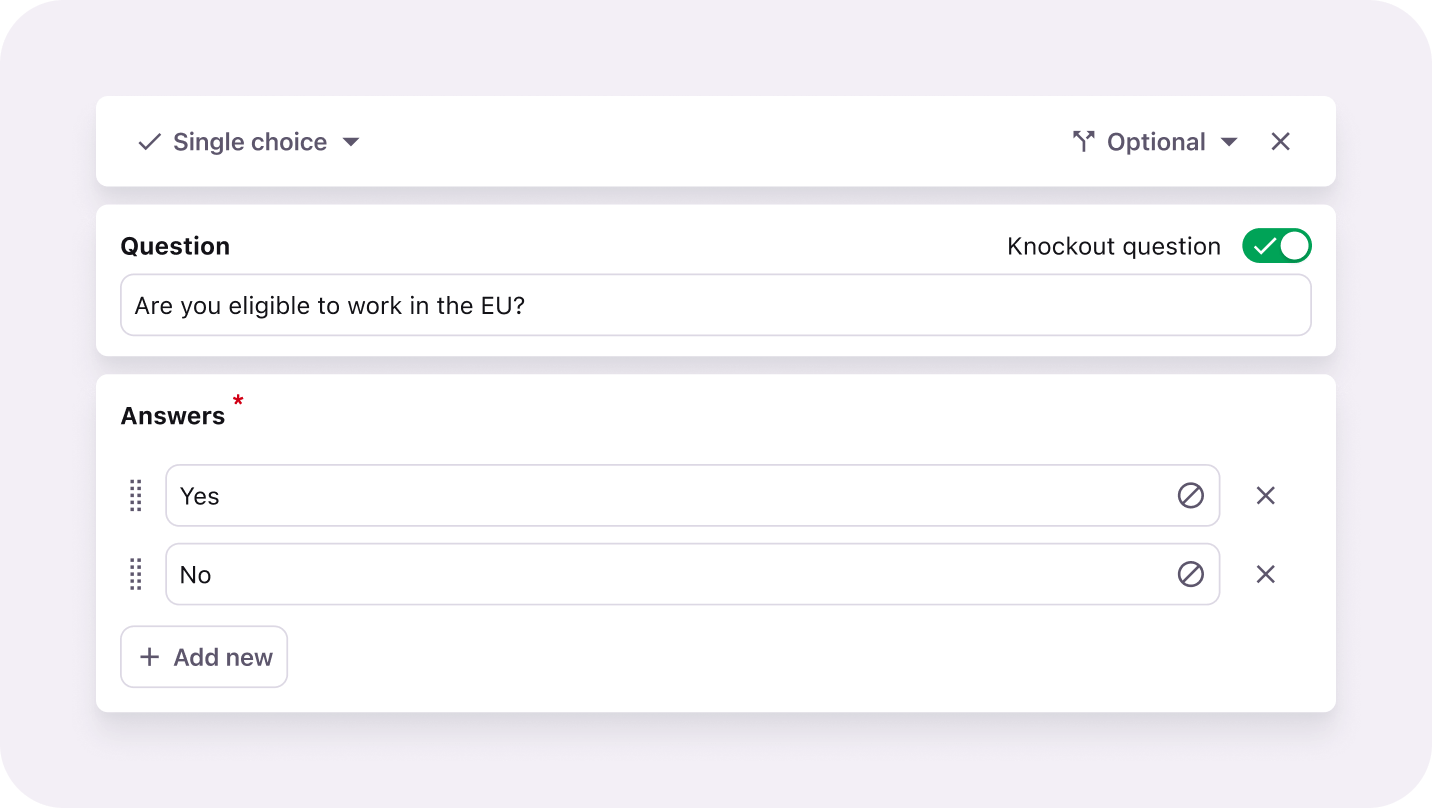
Knock out questions in Tellent Recruitee help you screen candidates who meet baseline criteria
Only use knockout questions for requirements that are truly non-negotiable. Overusing them can filter out strong candidates unnecessarily.
This keeps screening aligned with role requirements, improves visibility into why candidates are rejected, and saves your team time reviewing unqualified applicants.
|
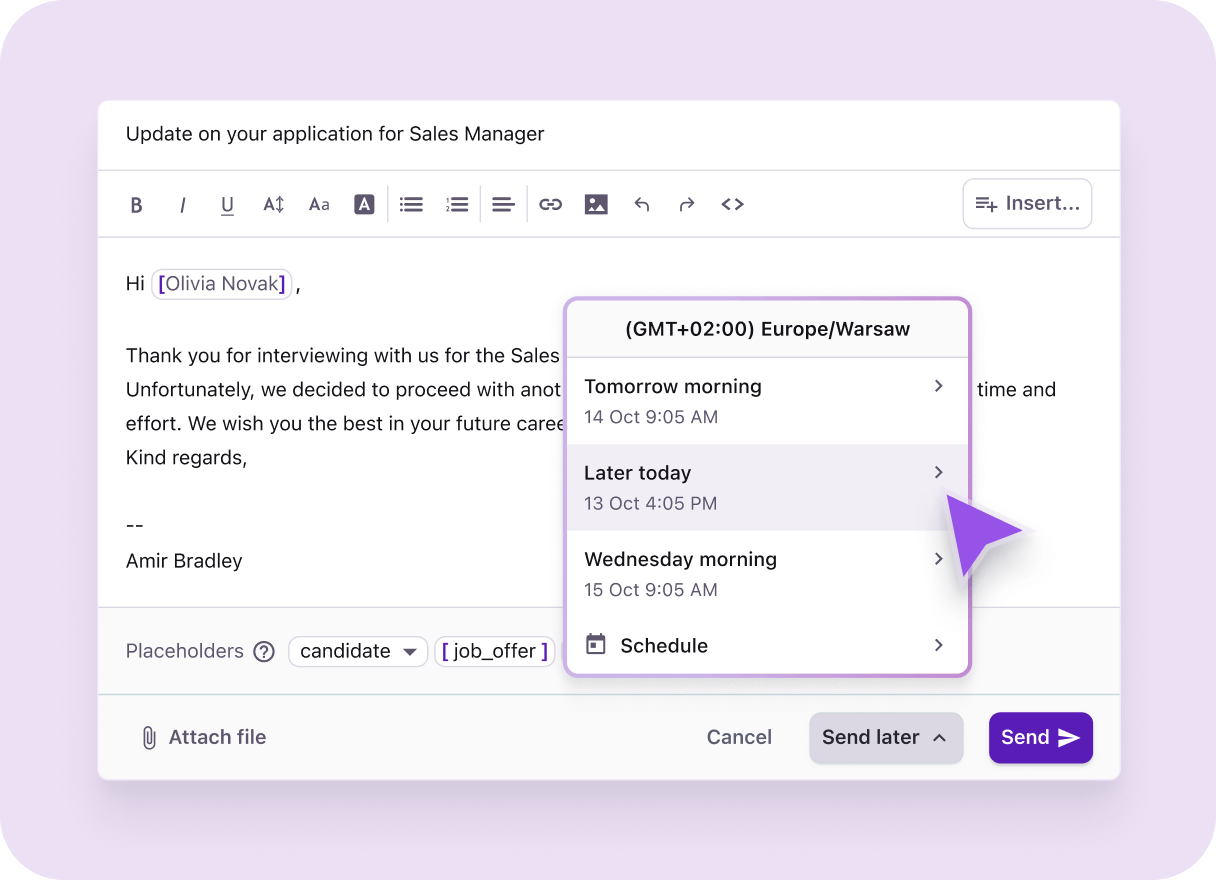
Pro tip: Improve candidate experience by automating rejection emails for applicants who don’t make it past initial screening. In Tellent Recruitee, you can assign an automated email action to a disqualifying reason. This way, when a candidate is disqualified via a knockout question, the ATS sends a predefined rejection message to them, saving your team from manually sending rejection emails.
|
3. Use structured pre-screening questions to filter candidates early
Pre-screening questions collect structured information before you review resumes, making it easier to compare candidates quickly — especially when application volume is high.
Unlike knockout questions, they don’t automatically disqualify applicants. Instead, they surface the most relevant information upfront, so you can prioritize qualified candidates without manually interpreting every resume.
Use them to assess:
- Depth of experience in a specific skill or responsibility (e.g. What level of responsibility have you had for paid search campaigns?)
- Familiarity with required tools or systems (e.g. Which CRM platforms have you used in the past 2 years?)
- Scope of ownership (e.g. Have you managed budgets over $100K? or Have you led cross-functional projects?)
- Context that may not be obvious from a resume (e.g., Why are you interested in this role?)
Use the responses to prioritize candidates who best match your must-haves and high-impact criteria.
Build these questions directly from the qualification criteria agreed with the hiring manager — keeping them focused and role-specific. If a question doesn’t help you decide who should move forward, remove it.
Also, avoid asking for information that you can already find in a candidate’s resume.
4. Use AI to screen resumes using consistent evaluation criteria
Instead of manually reviewing resumes, which can be both time-consuming and inconsistent, use AI to screen them against your predefined job requirements.
This is especially helpful when you have to sift through thousands of applications as it allows you to standardize the first pass so your team can move faster, reduce workload, and focus on higher-quality decisions.
When you enable Screening Assistant in Tellent Recruitee as you publish jobs, the AI reads candidates’ CV, cover letter, and screening questions to show how many of your requirements each candidate meets (you can set up to six job-specific criteria).
The results appear as a purple score on candidate profiles — clicking on it shows you which criteria the candidate meets.
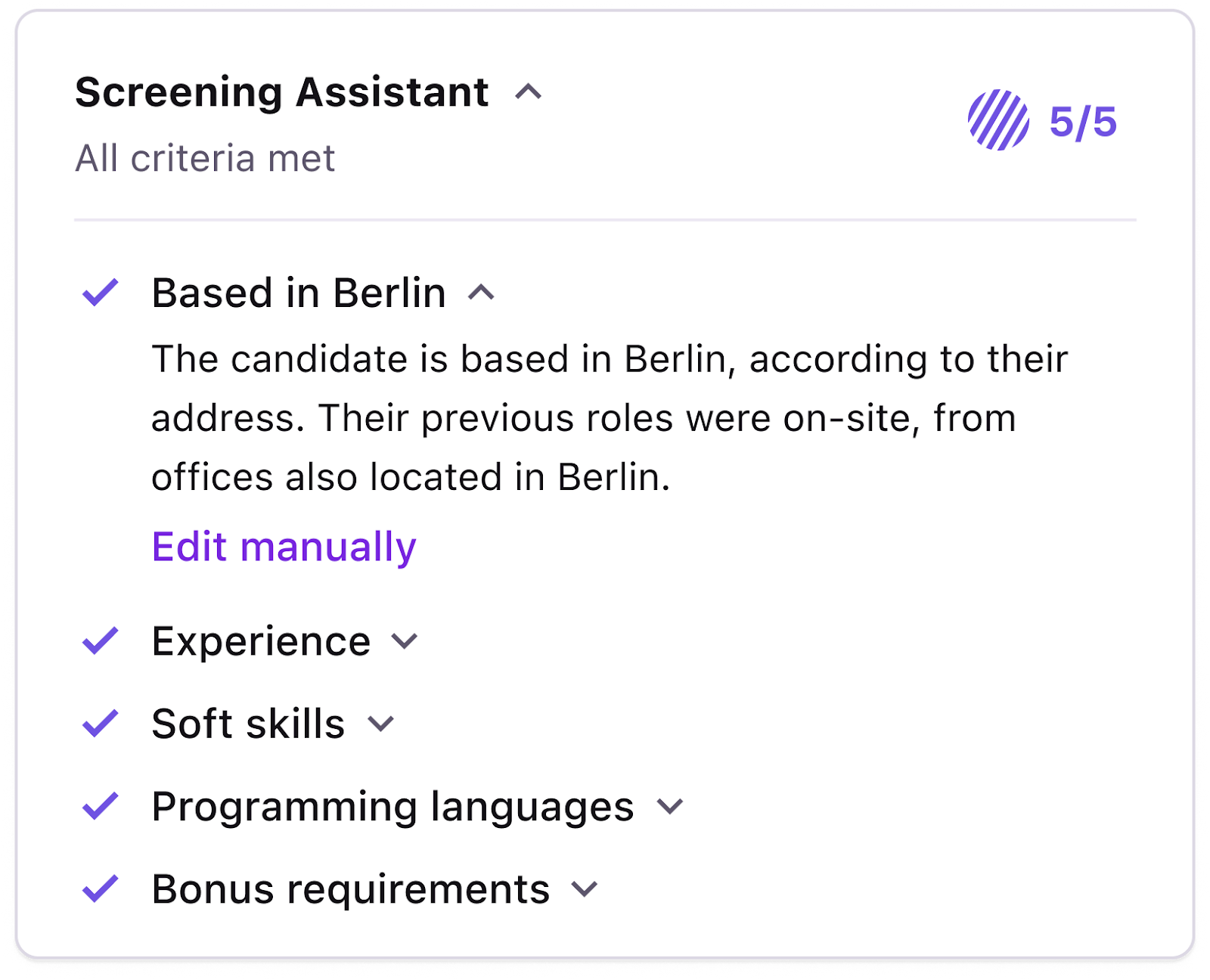
Screening Assistant in Tellent Recruitee rates candidates against six specific criteria you define
Keep in mind, though, use AI only to prioritize —not to make decisions (more on this below).
To this end, it’s essential you:
- Write clear, specific, and verifiable screening criteria that the AI can identify from a candidate’s application (instead of focusing on subjective or personal traits).
- Use your human judgment to review the results, evaluate, and shortlist candidates for the next stage of your hiring process.
5. Review AI-screened candidates using human judgment
AI screening is an initial filter to speed up candidate screening, never a final decision maker.
Kamila uses Screening Assistant to quickly prioritize candidates who meet more requirements, but advises always double-checking filtered candidates’ resumes.
Review the top AI-ranked candidates in batches — focusing on the strongest matches first, then use your judgment to validate fit.
During your review:
- Double-check that the candidate truly meets must-have requirements
- Evaluate the depth and impact of experience
- Check for transferable skills that AI may not fully interpret
- Validate consistency between resume claims and application responses
Use this step to confirm who should move forward — not to restart manual screening. AI helps you prioritize. Human review ensures the shortlist is intentional.
Dig deeper: How to get your hiring team to give interview feedback faster.
Don’t forget to document why shortlisted candidates move forward to keep decisions consistent and defensible.
A reliable ATS supports this too by letting you add notes directly to each candidate’s profile.
This keeps evaluation reasoning centralized and accessible — rather than scattered across inboxes, spreadsheets, or Slack threads.
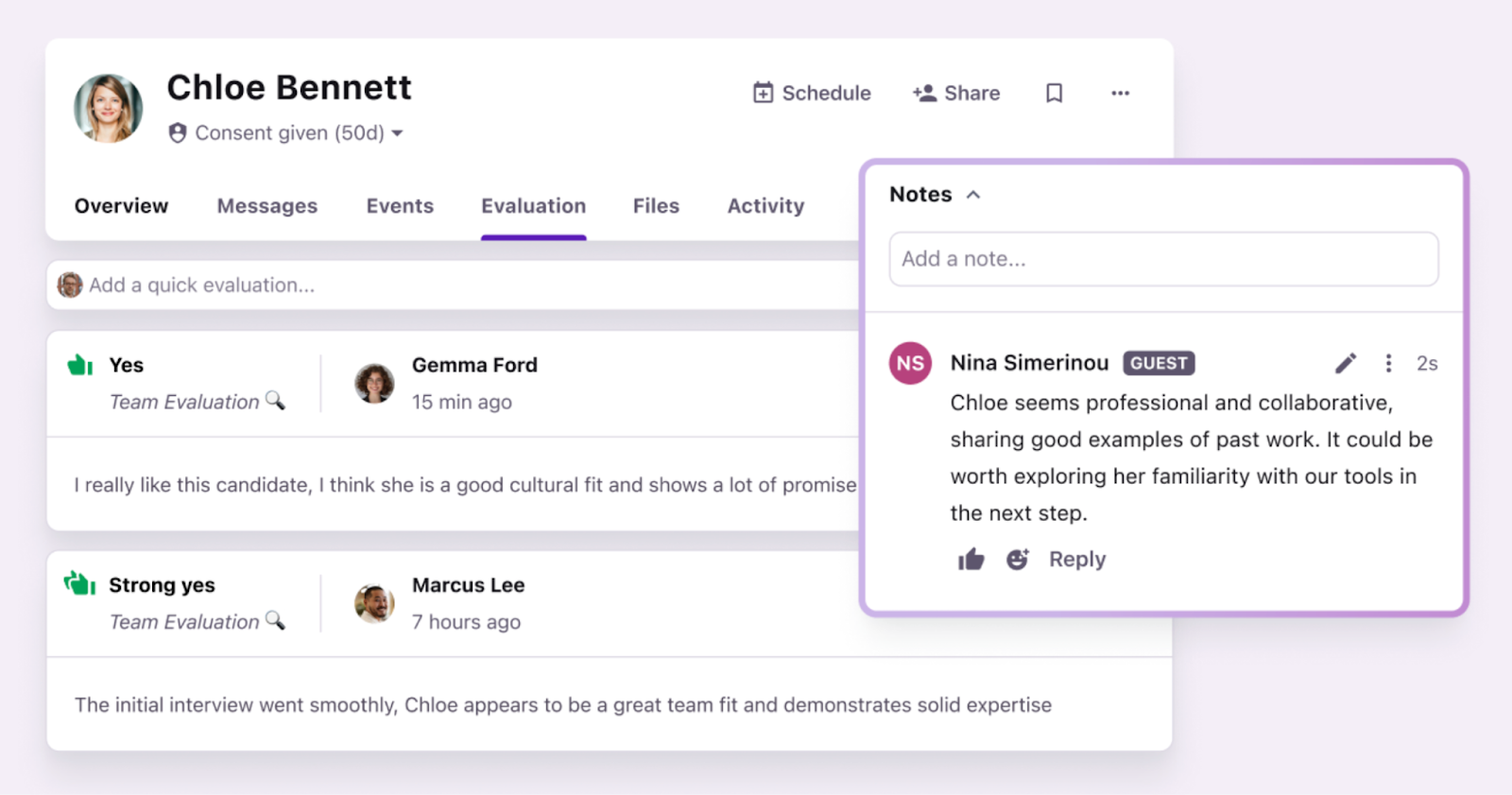
Add notes on each candidate you evaluate in one system
6. Standardize candidate screening across hiring teams
As hiring volume grows, inconsistency in your screening process becomes a major bottleneck.
Standardizing your approach ensures everyone on the hiring committee evaluates candidates against the same criteria — improving speed, alignment, and scalability.
Without standardization, every new role forces your team to rebuild the screening process — rewriting structured questions, redefining expectations, and slowing hiring as you scale.
In Tellent Recruitee, you can standardize screening by reusing job templates and pre-saved screening questions across similar roles:
Use job templates for recurring roles
If you frequently hire for similar positions (e.g., SDRs, Customer Success Managers, Engineers), use job templates to avoid rebuilding each job posting from scratch.
Job templates pre-fill essential job details such as the job description, employment details, and application form — making your screening setup consistent across similar openings.
You can create your job templates in three ways:
- Use an existing template — customize one from the template gallery
- Duplicate an existing job posting — base your template on a live or past role
- Start from scratch — build a new template tailored to your needs
This reduces setup time and ensures similar roles follow the same screening structure as you scale.
Create screening question templates
Instead of rewriting screening questions for every new role, choose from Tellent Recruitee’s screening question templates or create your own to reuse across similar positions.
When creating a template, assign a category (for example, Growth Team) and select the answer format — single or multiple text lines, yes/no, single or multiple choice, etc. You can also mark questions as mandatory or optional.
.png?width=1216&height=880&name=EN%20Content_%20-%20article%20image%20-%201%20(2).png)
Then, as you set up a new job’s application form, select a pre-saved screening question template to add consistent questions quickly.
Remember, standardization doesn’t remove flexibility. It creates a repeatable foundation — so your team can move faster without lowering hiring quality.
7. Regularly track and improve your screening process effectiveness
As hiring volume, roles, and team dynamics change, your screening approach should evolve with them.
To improve your screening process intentionally — not based on gut feel or assumptions — track and regularly review data in your ATS.
Without performance data, you won’t know whether too many unqualified candidates are reaching interviews, strong candidates are being filtered out too early, or candidates are sitting too long in screening stages.
Track these key metrics:
|
Screening process metric |
What it is |
Why it matters |
|
Screening-to-interview ratio |
|
A high ratio may indicate weak filtering; a very low ratio may mean over-screening |
|
Interview-to-offer ratio |
Percentage of interviewed candidates who received an offer |
A low ratio may signal that screening isn’t qualifying candidates effectively |
|
Candidate drop-off during screening |
Percentage of applicants who abandon the application process before completing screening |
High drop-off may suggest overly long or complex application forms |
|
Time spent in screening stages |
Average time candidates remain in screening before being moved forward or rejected |
Long durations may indicate internal bottlenecks or delayed decisions |
|
Hiring manager feedback turnaround time |
Time it takes hiring managers to review screened candidates and provide feedback |
Slow response times can stall qualified candidates and extend time-to-hire |
Review these metrics at least quarterly. If ratios drift or delays increase, revisit your qualification criteria or the logic of your knockout questions.
The best part? Tracking recruitment metrics doesn’t have to be complicated, especially if your hiring process runs inside an ATS.
In Tellent Recruitee, for example, you can use reporting templates to monitor stage conversions, time in stage, and overall process performance.
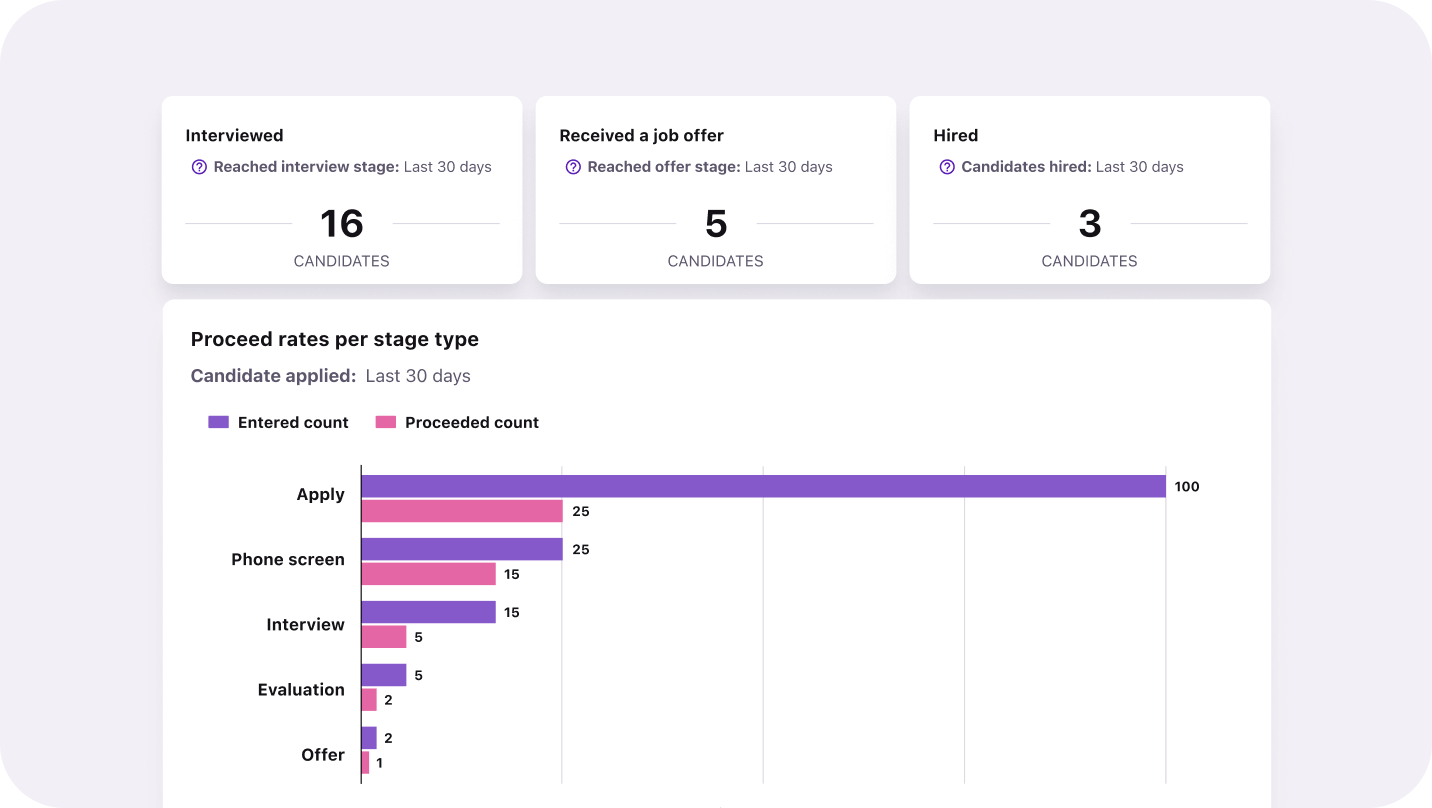
Track your screening process effectiveness in Tellent Recruitee
You can also create custom dashboards to track metrics that matter most to your team — such as applications per source or candidate drop-offs.
Common candidate screening mistakes that slow hiring
Candidate screening becomes inefficient when the process is reactive, subjective, or inconsistent.
Avoid these most common screening mistakes that increase time to hire and reduce candidate quality:
- Lack of qualification alignment
If recruiters and hiring managers aren’t aligned on must-haves and dealbreakers, shortlists become inconsistent, and interviews multiply unnecessarily.
- Over-reliance on resume
Resumes don’t consistently show how well someone performed, how much ownership they had, or whether their experience matches your real requirements. Without structured screening criteria, recruiters interpret resumes differently — which leads to inconsistent shortlists.
- Not centralizing screening feedback
When screening feedback lives in inboxes or Slack threads, recruiters have to chase responses, consolidate opinions, and clarify decisions. That coordination delay keeps candidates waiting and stretches the time to hire.
- Overscreening candidates
When you add too many screening steps (long forms, unnecessary assessments, etc), you increase candidate drop-off, slow down early decision-making, and delay interviews for qualified candidates. Consequently, strong candidates may withdraw or accept other offers before reaching the interview stage.
- Under-structured screening interviews
When screening calls lack clear evaluation criteria, decisions rely on gut feel instead of measurable signals — leading to weak shortlists and repeat interviews.
Wrap up: Turn resume overload into structured screening that reduces time to hire
Candidate screening isn’t just an early step for filtering unqualified applicants — it’s where hiring speed is won or lost.
When you standardize screening criteria, automate early filtering with AI and knockout questions, and centralize the process in one system like an ATS, you avoid interview overload without sacrificing hiring quality.
Such a structured screening process reduces candidate drop-off, shortens time to hire, and improves candidate experience — without increasing workload.
Take it from Livestorm. Their VP of People, Marie-Agnès Deharveng, shares:
The result? Livestorm reduced their time-to-hire from 60 days to 25 days — a 2.5 times improvement.
Ready to build a faster screening process? Learn how Tellent Recruitee gives you the tools to do so — from knockout questions and Screening Assistant to centralized workflows and reporting dashboards.